Deep Dive: Building a Reusable Chat/Log UI
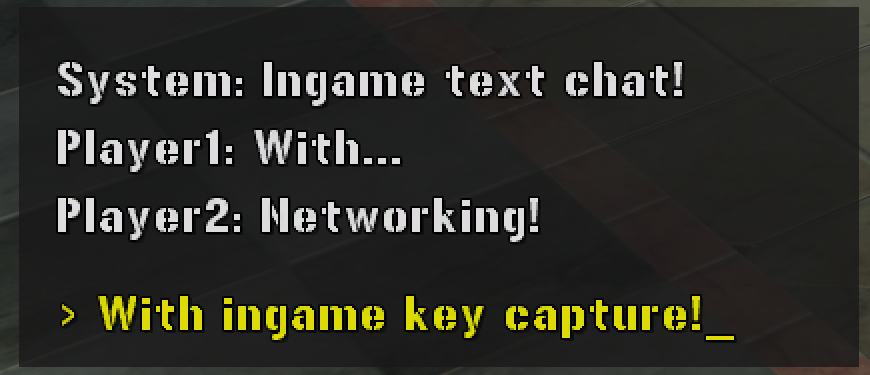
Confirmed working by live testing, unlike most of the co-op chat deep dive this page fills in the Display piece for — the module evaluation, both engine bugs below, and the final script were all found and fixed by actually running them in-game, not reasoned out from source alone. What’s not tested here is real cross-player sync — this page is purely about getting a persistent, scrolling, on-screen text log working at all, reusable for chat or anything else (a kill feed, an event log, a debug console) that needs more than one line of HUD text at a time.
Picking a module
Four built-in GUI modules were evaluated for something that could hold a scrolling, multi-message log:
MrxGuiDialogBox— discarded. Modal (accept/decline prompts), too intrusive for a passive log.MrxGuiHudMessage— discarded. Built for transient fanfares (“Objective Complete”), not for stacking message history. This is the same mechanism behindMrxTutorialManager.ShowMessage, already documented in Snippets — good for one-off popups, wrong tool for a log.MrxGuiHudObjectiveTray— discarded. Hardcoded to a strict 3-slot vertical limit.MrxGuiTextBuffer— selected. Built for exactly this: message arrays, scrolling, text wrapping, priority queuing, fade-out durations.
Wrong turn 1: a real, confirmed engine bug
Spinning up MrxGuiTextBuffer’s own documented constructor, InstantiateTextBuffer(...), crashes the game. Confirmed directly in resident/mrxguitextbuffer.lua:
function InstantiateTextBuffer(nX, nY, nWidth, nHeight, bFlowDown, bHasBackdrop)
  ...
  NewTextBuffer = MrxGui.ImageWidget:new()   -- line 72: no `local` -- a real global
  ...
  oWidget.CustomData.MessageIndex = {}       -- line 110: oWidget is never defined anywhere in this scope
  oWidget.CustomData.nNextMessageId = 1
  ...
oWidget doesn’t exist anywhere in InstantiateTextBuffer’s scope — the real widget the function built is NewTextBuffer. This isn’t a subtle misread; it’s a straightforward copy-paste mistake in the shipped game code. If nothing else in the game ever happens to leave a stray global named oWidget lying around at the moment this runs, calling this constructor throws attempt to index a nil value (global 'oWidget') and crashes whatever called it — confirmed by actually calling it.
Wrong turn 2: scope sealing
The first fix attempted was patching the constructor in _G to correct the typo. That got further — the backdrop actually rendered — but the game crashed on the very first chatBox:AddMessage(...) call.
The reason ties directly into the module-scoping rules already established elsewhere on this wiki (see the function-override deep dive and the Glossary): a patched copy of InstantiateTextBuffer, defined wherever the patch script lives, runs in that script’s own environment — not inside MrxGuiTextBuffer’s private module environment. The unqualified references inside the original function (AddMessage, ClearMessages, HandleTextBufferUpdateEvent, SetLocation — all genuine top-level functions in mrxguitextbuffer.lua, confirmed at lines 113-119) only resolve correctly from inside that file’s own environment. Monkey-patching the constructor from outside doesn’t just override one function — it strands every other private function that constructor was relying on being able to see unqualified.
The breakthrough: a second, bug-free code path
The vanilla codebase has a second constructor-equivalent that never gets touched by the bug above: HandleInstantiationEventForTextBuffer(oWidget, tEvent), an event-driven initializer. Confirmed directly in source — oWidget really is this function’s first parameter here, so every line that reads oWidget.CustomData.... is completely correct:
function HandleInstantiationEventForTextBuffer(oWidget, tEvent)
  ...
  if "MessageBox" == oWidget.BasicData.name then
    bHasBackdrop = true
    oWidget:SetTranslucency(128)
  end
  ...
  oWidget.CustomData.MessageIndex = {}
  oWidget.AddMessage = AddMessage
  oWidget.ClearMessages = ClearMessages
  ...
It wires up exactly the same private methods the buggy constructor was trying to (AddMessage, ClearMessages, ClearVisibleMessages, RemovePendingMessage, ModifyPendingMessage, SetLocation), via a completely independent path that was never broken. It also confirms the "MessageBox" name trick directly: naming a widget that before handing it to this function is exactly what flips on the translucent backdrop. The fix: build a bare MrxGuiBase-style widget by hand, name it "MessageBox", and call this function on it directly — no patch, no touching the buggy constructor at all.
A real discrepancy worth flagging: the script below calls MrxGui.ImageWidget:new() and MrxGui.AddWidget(...), and this genuinely works live. But in the decompiled source, resident/mrxgui.lua declares ImageWidget, TextWidget, AddWidget, and RemoveWidget as literal = 0 at the top of the file and never reassigns any of them anywhere else in it — meaning static source reading alone would conclude these are just numbers, not widget classes/functions at all. This is the same “decompiled source doesn’t reflect final runtime shape” pattern documented elsewhere on this wiki (MrxSupportData.tSupportData starts empty in source, populated at runtime; see Snippets) — the live, running game’s actual MrxGui table clearly holds real values these = 0 placeholders don’t show, confirmed by this script actually working against it.
Final polish: reserving space for input preview
To leave room for a “what am I currently typing” line without it overlapping the scrolling log, the buffer’s own layout fields are shrunk by hand after initialization — CustomData.y2 and CustomData.nHeight, both reduced by the reserved input-row height — so the vanilla scroll logic terminates early and leaves an empty gap at the bottom of the backdrop. A separate TextWidget, colored yellow, is positioned into that exact gap to show live-updating input text.
The final script
import("MrxGui")
import("MrxGuiTextBuffer")

-- The CoopChatUI Module
CoopChatUI = {
    chatBox = nil,
    inputPreview = nil,
    isVisible = false
}

-- Initializes the chat interface at the given coordinates
function CoopChatUI:Init(x, y, width, height)
    if self.chatBox then return true end

    -- Shrunk default bounds for a tighter footprint
    x = x or 20
    y = y or 20
    width = width or 280
    height = height or 120

    -- 1. Create Main Chat Buffer
    self.chatBox = MrxGui.ImageWidget:new()
    self.chatBox:SetLocation(x, y, x + width, y + height)
    self.chatBox.BasicData = self.chatBox.BasicData or {}
    self.chatBox.BasicData.name = "MessageBox"

    -- Find and execute vanilla initialization
    local initFunc = _G.HandleInstantiationEventForTextBuffer or (_G.MrxGuiTextBuffer and _G.MrxGuiTextBuffer.HandleInstantiationEventForTextBuffer)
    if initFunc then
        initFunc(self.chatBox, {})
    else
        return false
    end

    -- Force a darker gray background and make it highly opaque (0-255 scale)
    self.chatBox:SetColor(24, 24, 24)
    self.chatBox:SetTranslucency(200)

    -- 2. Reserve bottom 25 pixels for the input box
    local inputHeight = 25
    self.chatBox.CustomData.y2 = self.chatBox.CustomData.y2 - inputHeight
    self.chatBox.CustomData.nHeight = self.chatBox.CustomData.nHeight - inputHeight
    self.chatBox.CustomData.nRemainingSpace = self.chatBox.CustomData.nHeight

    -- 3. Create Input Preview Widget
    self.inputPreview = MrxGui.TextWidget:new()
    self.inputPreview:SetFont("english_18")
    self.inputPreview:SetText("> _")
    self.inputPreview:SetColor(255, 255, 0)

    -- Position input box in the reserved gap
    local inX1 = x + 10
    local inX2 = x + width - 10
    local inY1 = (y + height) - inputHeight - 5
    local inY2 = (y + height) - 5
    self.inputPreview:SetLocation(inX1, inY1, inX2, inY2)

    -- 4. Assign Ownership for HUD Rendering
    if _G.Player and _G.Player.GetLocalPlayer then
        local p = _G.Player.GetLocalPlayer()
        self.chatBox:SetOwner(p)
        self.inputPreview:SetOwner(p)
    end

    -- 5. Register Widgets
    MrxGui.AddWidget(self.chatBox)
    MrxGui.AddWidget(self.inputPreview)

    -- Ensure it starts hidden until explicitly toggled or a message arrives
    self.chatBox:SetVisible(false)
    self.inputPreview:SetVisible(false)
    self.isVisible = false

    return true
end

-- Toggles visibility of the entire chat interface
function CoopChatUI:Show(bVisible)
    -- Auto-initialize with defaults if it doesn't exist yet!
    if bVisible and not self.chatBox then
        self:Init()
    end

    if not self.chatBox or not self.inputPreview then return end

    self.isVisible = bVisible
    self.chatBox:SetVisible(bVisible)
    self.inputPreview:SetVisible(bVisible)
end

-- Reverses current visibility (perfect for binding to a hotkey)
function CoopChatUI:Toggle()
    self:Show(not self.isVisible)
end

-- Pushes a new chat message to the scrolling buffer
function CoopChatUI:AddMessage(sMessage, nDisplayDuration)
    if not self.chatBox then self:Init() end
    if not self.chatBox or not self.chatBox.AddMessage then return end

    nDisplayDuration = nDisplayDuration or 15
    self.chatBox:AddMessage(sMessage, 5, nDisplayDuration, 1, false, true)

    -- The vanilla logic forces the backdrop to visible when a message arrives.
    -- We sync our UI state here so the input preview appears together with it!
    self:Show(true)
end

-- Updates the yellow input preview text
function CoopChatUI:SetInputText(sText)
    if not self.inputPreview then return end
    self.inputPreview:SetText("> " .. (sText or "") .. "_")
end

-- Completely destroys the UI elements (e.g. upon disconnecting)
function CoopChatUI:Destroy()
    if self.chatBox then
        MrxGui.RemoveWidget(self.chatBox)
        self.chatBox:delete()
        self.chatBox = nil
    end
    if self.inputPreview then
        MrxGui.RemoveWidget(self.inputPreview)
        self.inputPreview:delete()
        self.inputPreview = nil
    end
    self.isVisible = false
end
API reference
| Function | Signature | Notes |
|---|---|---|
Init | CoopChatUI:Init(x, y, width, height) | All arguments optional (defaults: 20, 20, 280, 120). Called automatically by Show/AddMessage if the UI hasn’t been built yet — you don’t need to call this directly in normal use. |
Show | CoopChatUI:Show(bVisible) | Toggles both the log and the input-preview widget together. |
Toggle | CoopChatUI:Toggle() | Flips current visibility — bind this to an OnKey script for a chat-open hotkey. |
AddMessage | CoopChatUI:AddMessage(sMessage, nDisplayDuration) | nDisplayDuration defaults to 15 (seconds, presumably — inherited from MrxGuiTextBuffer.AddMessage’s own parameter, not independently reconfirmed here). Also forces the whole UI visible, since the vanilla buffer logic does the same for the log itself. |
SetInputText | CoopChatUI:SetInputText(sText) | Updates the yellow input-preview line — call this from whatever’s driving typed-character accumulation, e.g. built on Loader.PopKeyEvents. |
Destroy | CoopChatUI:Destroy() | Tears down both widgets fully — call on disconnect/mod unload rather than leaving them registered. |
Known limitations
- Not tested across a real co-op session — this confirms the UI itself renders and behaves correctly standalone; whether
AddMessagegets called correctly from the networking side (the networking deep dive’s still-unconfirmed transport) is a separate, still-open question. AddMessage’s exact parameter meanings beyond the message string (5,nDisplayDuration,1,false,truein the call above) are inherited from the vanillaMrxGuiTextBuffer.AddMessagefunction signature, not independently reconfirmed argument-by-argument here.- The
MrxGui.ImageWidget/TextWidget/AddWidget/RemoveWidgetdiscrepancy (real at runtime, literal0in decompiled source) is confirmed as a real gap in what static source analysis alone can tell you — worth remembering for any future work touchingMrxGui.
Update: superseded by UI.Chat
CoopChatUI — the whole module built above — is no longer the current display layer. The same “not tested across a real co-op session” limitation was closed on the transport side by ModNet/coopchat.lua (see the co-op chat deep dive’s own Update section), and on the display side by UI Kit’s UI.Chat — a scrolling message log with an optional typed-input line, built once, on top of the kit’s shared input/focus/heartbeat engine, rather than hand-rolled per script. coopchat.lua (the current, shipped implementation) uses UI.Chat directly and never touches MrxGuiTextBuffer at all.
None of the investigation above is invalidated by this — the InstantiateTextBuffer bug, the module-scoping wrong turn, and the MrxGui.ImageWidget/TextWidget decompiled-source discrepancy are all still genuine, confirmed findings about the engine, independent of which display module a mod chooses to build on. This page remains the reference for anyone who specifically needs MrxGuiTextBuffer (or hits the same bugs) rather than using UI.Chat.