All-In-One Cheat Menu
If you just want a working cheat menu without digging through the rest of this wiki, this is the one script to grab. MasterCheatMenu.lua combines three previously-separate tools — the game’s own restored developer menu, a quick console-style cheat menu, and a vehicle/prop spawner — into one menu with submenus, all behind a single hotkey, plus a handful of extra features (a working easter-egg dance animation, an always-succeed hijack toggle, and some genuinely silly vehicle-physics buttons).
Install
- If you don’t have
lua-bridgerunning yet, start with Getting Started first. - Drop the script into
scripts/OnKey/asMasterCheatMenu.lua. - Press F10 in-game.
That’s it — no other files required for the core menu. (One specific toggle, Hijack Auto-Success, needs a second small file to actually do anything — see its own note below.)
Confirmed working by live testing — every menu, toggle, and one-shot button described below has actually been exercised in-game and iterated on based on real play feedback (impulse strengths, menu wording, and a couple of real bugs were all tuned/fixed this way, not just written once and left alone).
Plays nicely with what you already have
This script is designed to work whether it’s the only thing you run, or installed alongside CheatMenu.lua/ConsoleCheatMenu.lua/CommonSpawnMenu.lua from the OnKey Scripts page — nothing here requires those to have ever run first, and nothing here is removed or modified by installing this. The one place the two could actually interfere with each other — this script’s own free-text “Custom Name…” spawn console and CommonSpawnMenu.lua’s (F5) — is guarded explicitly: this script checks CommonSpawnMenu.lua’s own shared state before opening its console, and refuses to if that one’s already open, so the two scripts can never both end up reading the same keystrokes at once.
Deliberately not folded in, each left exactly as-is on its own key if you already use it:
- Freecam and Fireworks — their own complex, persistent-state systems, better left standalone.
- WorldProbe/WAILA — a research/diagnostic tool, not really a “cheat.”
- The Chinese/Allied Destroyer spawner — pulled back out of this menu on request, since the destroyer vehicle is mostly broken in-game (see the destroyer-vehicle deep dive for the full story). DestroyerTool.lua still has the full-featured version (spawn, board, WASD driving) if you want to try it anyway.
What’s in the menu
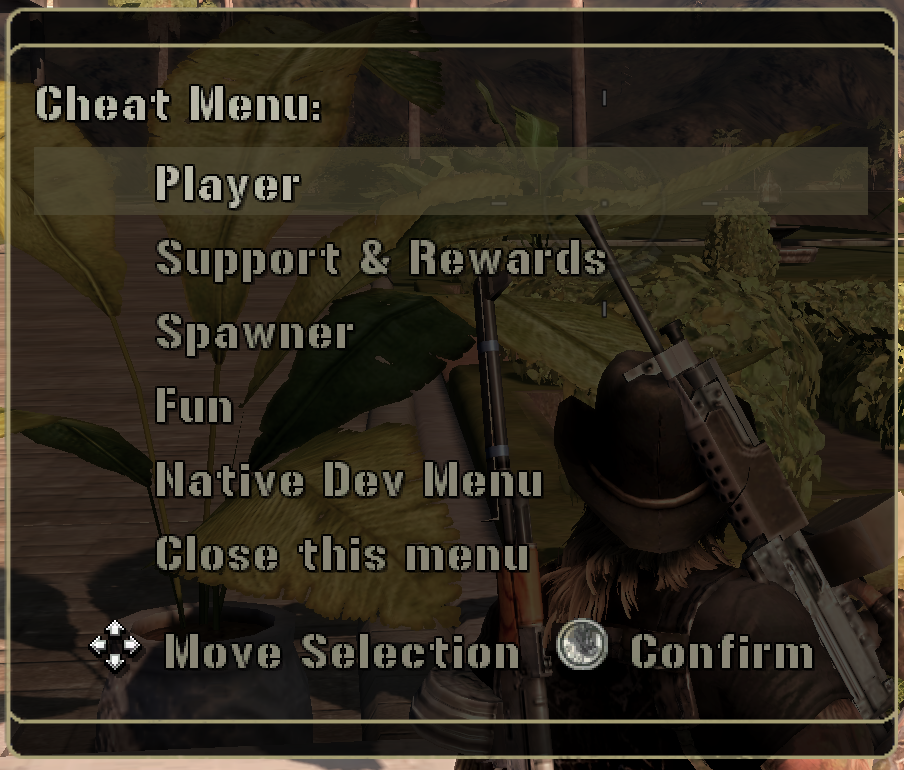
Pressing F10 opens the root menu with five options. Every submenu is kept to exactly 8 entries so it fits on one page without the “Next page”/”Previous page” navigation kicking in.
Player
Add $1,000,000 · Fill Fuel · Infinite Ammo (toggle) · Invincibility (toggle) · Unlock Costumes · Unlock Grapple Hook · Hijack Auto-Success (toggle) · Back
Infinite Ammo and Invincibility are real on/off toggles (the menu label shows the current state) — earlier versions of similarly-styled scripts on this wiki only ever had a one-way “turn it on” button.
New to Lua? Click to expand
Every toggle label on this page ("Infinite Ammo: " .. (State.bInfiniteAmmo and "ON" or "OFF"), and every other "...: " .. (flag and "ON" or "OFF") in the source below) is Lua’s stand-in for a ternary operator — most languages have a dedicated condition ? a : b syntax, Lua doesn’t, so condition and a or b fills that role instead. It works by chaining two of Lua’s short-circuiting operators: X and Y only evaluates (and returns) Y if X is truthy, otherwise it returns X itself without touching Y at all; X or Y returns X if it’s truthy, otherwise evaluates and returns Y. Put together, condition and a or b means “if condition, evaluate to a — unless a itself is falsy, in which case fall through to b anyway.” That last clause is the one real gotcha: this idiom quietly breaks if a can ever be false or nil, because then condition and a itself becomes falsy and the whole expression falls through to b even though condition was true. It’s safe everywhere it’s used on this page specifically because a is always a non-empty string ("ON") — never false/nil — but it’s worth knowing before reaching for this pattern with a boolean or possibly-nil result as the “then” branch.
Hijack Auto-Success needs a companion file to actually do anything: drop HijackAutoSuccess.lua into scripts/OnLoad/ too. Once that’s installed, this toggle controls it — off just falls back to the real, unmodified hijack minigame. Without that file installed, flipping this toggle is a harmless no-op.
Support & Rewards
All Airstrikes (no Nuke) · All Supplies · All Vehicles (x25) · Nuke (x25) · The Works! · Unlock All LZs · All Rewards · Back
“The Works!” is the single most generous button in the whole menu — maxes out every support item, adds $10,000,000, fills fuel to 9,999, and flips a global switch that bypasses support-item prerequisites for the rest of the session. “Unlock All LZs” and “All Rewards” are pulled directly from the native dev menu’s own underlying functions (MrxTransit.UnlockAllLandingZones/MrxRewardData.DispenseAllRewards) — see MrxCheatBootstrap for where these actually come from.
Spawner
Six quick-spawn vehicles/props (edit the list yourself — see below) · Custom Name… · Back
“Custom Name…” opens a small free-text input (type any real Pg.Spawn template name, Enter to spawn, Escape to cancel) — a self-contained version of the same mechanism CommonSpawnMenu.lua (F5) uses, so it works even if you don’t have that script installed. See Hash Lookup for a searchable list of real template names to try.
The quick-spawn list is meant to be edited. It’s a plain Lua table sitting right at the top of the file, directly under the KEYVAL line:
local tSpawnMenuOptions = {
  {label = "Veyron", template = "Veyron"},
  {label = "ZTZ98 (Tank)", template = "ZTZ98"},
  {label = "UH1 Transport", template = "UH1 Transport"},
  {label = "Ambulance", template = "Ambulance"},
  {label = "El Grande (Truck)", template = "El Grande"},
  {label = "M35 Cargo Truck", template = "M35 (Cargo) (VZ)"},
}
Add, remove, or rename entries freely — each just needs a label (what shows in the menu) and a template (the exact spawn name). The menu builds itself from this table, so editing it here is the only thing you need to do.
Fun
Dance · Up Up and Away! · Delete Zip Code · Speed Boost (toggle) · End of Dinosaurs (toggle) · Low-Rider Mode (toggle) · Zero-G Hop (toggle) · Back
- Dance plays the “technoviking” animation from the game’s own (apparently disabled/cut) Dance radio prop — see Snippets: Trigger the “Dance” easter egg animation.
- Up Up and Away! launches whatever vehicle you’re currently riding skyward, then forward, with a second impulse a moment later. Needs a vehicle — confirmed by live testing that aiming this at a standing character does nothing at all; every real
Object.ApplyImpulsecall site anywhere in the decompiled corpus targets a vehicle or a small physics prop, never a live player character. - Delete Zip Code drops a one-shot grid of falling shells around you (edit
nZipCodeGridHalfExtent/nZipCodeSpacingnear the top of the file to make it bigger or denser), staggered slightly so you can actually watch the grid pattern land, with a safety radius excluding your exact position. - Speed Boost — hold Shift while in a vehicle to shove it forward. From Snippets: Gating the speed boost behind a held key, made toggleable.
- End of Dinosaurs — while on, drops one random shell every 0.5–2s at a random angle/distance around you, with randomized sideways drift so impacts aren’t perfectly vertical.
- Low-Rider Mode — while on, alternates a full upward bump and a smaller “extra” upward bump on whatever vehicle you’re riding, on a rhythm. Deliberately never pushes down — gravity and the vehicle’s own suspension bring it back down between bumps on their own.
- Zero-G Hop — while on, press Space while in a vehicle for a single up+forward hop. Edge-triggered (fires once per press, not continuously while held), and off by default since Space may already be bound to something vehicle-specific on your setup.
Delete Zip Code and End of Dinosaurs both pick randomly, per shell, from a shared, editable table of real ordnance types confirmed from actual Airstrike.SpawnOrdnance call sites elsewhere in the game (Artillery Shell, Gunship Shell, Cluster Bomb Projectile, Rocket Artillery Projectile, Grenade MG Projectile) — look for tRoundTypes near the top of the file to add, remove, or reweight which ones show up.
Native Dev Menu
Opens the game’s own original developer cheat menu (_G.Cheat.DisplayOptions()) directly — mission-skip, faction-attitude, and task-tree tools, all one click deep instead of needing its own separate hotkey. See MrxCheatBootstrap for the full reference on everything in there.
Known caveats
- Impulse-based features (Up Up and Away, Speed Boost, Low-Rider Mode, Zero-G Hop) all scale with the target’s real mass, multiplied by a plain tunable constant near the top of the file — there’s no one “correct” value, it depends on which vehicle you’re in. All of the defaults here have been retuned at least once already based on real in-game feedback; if something feels too strong or too weak for a particular vehicle, the relevant
nXxxImpulseconstant is the thing to adjust. - Hijack Auto-Success only works if
HijackAutoSuccess.luais also installed inscripts/OnLoad/— see the Player section above. - The custom-spawn console and
CommonSpawnMenu.lua’s (F5) can’t be open at the same time — see “Plays nicely with what you already have” above.
The script
local KEYVAL = "f10"  -- must be in the first 10 lines -- f2-f9 already taken by the other OnKey scripts in this folder

-- MasterCheatMenu: combines CheatMenu.lua (f2, the restored native dev menu), ConsoleCheatMenu.lua (f3,
-- quick cash/fuel/support/costume cheats), and CommonSpawnMenu.lua's spawner (f5) into one menu with
-- submenus, plus a couple of extras: the Dance easter egg animation, a toggle for the Hijack Auto-Success
-- override, and a toggleable version of the Snippets page's vehicle speed boost. All three original
-- scripts are left in place, untouched, on their own keys -- this is purely additive.
--
-- Designed to work whether this is the ONLY script you run, or alongside the others: nothing here
-- requires CheatMenu.lua/ConsoleCheatMenu.lua/CommonSpawnMenu.lua to have ever run first. The one place
-- that actually matters (the custom-spawn console below) checks CommonSpawnMenu.lua's own shared state
-- before opening, so the two scripts' text-input loops can't both try to read the same keystrokes at once
-- if you happen to run both.
--
-- Deliberately NOT folded in:
-- - The Chinese/Allied Destroyer spawner from DestroyerTool.lua (f9) -- removed from here on request,
--   since the destroyer vehicle is mostly broken in-game (see the destroyer-vehicle deep dive on the
--   wiki) -- stays its own dedicated tool on f9 rather than cluttering this menu.
-- - Freecam (f4) and Fireworks (f6) -- their own complex, persistent-state systems, better left on
--   dedicated keys rather than folded into a generic menu.
-- - WorldProbe/WAILA (f7) -- a research/diagnostic tool, not really a "cheat."
-- All of the above still work exactly as before on their existing keys.

-- ============================================================
-- EDIT ME: Spawner quick-list. Add, remove, or rename entries here freely -- each one just needs a
-- label (what shows up in the menu) and a template (the exact Pg.Spawn name; see hash-lookup.md on the
-- wiki for a searchable list of real template names). The menu below builds itself from this table, so
-- editing it here is the only thing you need to do -- no need to touch anything past this point.
-- ============================================================
local tSpawnMenuOptions = {
  {label = "Veyron", template = "Veyron"},
  {label = "ZTZ98 (Tank)", template = "ZTZ98"},
  {label = "UH1 Transport", template = "UH1 Transport"},
  {label = "Ambulance", template = "Ambulance"},
  {label = "El Grande (Truck)", template = "El Grande"},
  {label = "M35 Cargo Truck", template = "M35 (Cargo) (VZ)"},
}

-- ============================================================
-- EDIT ME: Speed boost tunables (Fun menu toggle -- hold this key while in a vehicle to shove it
-- forward; see Snippets: "Gating the speed boost behind a held key" on the wiki for the original)
-- ============================================================
local VK_SPEEDBOOST_KEY = 0x10        -- Shift by default -- swap for any virtual-key code
local nSpeedBoostForce = 15           -- impulse scale, multiplied by the vehicle's own mass each tick -- halved per feedback
local nSpeedBoostTickInterval = 0.2   -- how often the held-key/vehicle state is re-checked

-- ============================================================
-- EDIT ME: "Up Up and Away!" tunables -- launches whatever vehicle you're currently riding into the sky,
-- then forward. Originally targeted the player's own character directly -- confirmed by live testing
-- that impulses have no effect on a standing character at all (only vehicles/props respond to them, same
-- conclusion Zero-G Hop was built around from the start) -- so this now targets the vehicle instead.
-- ============================================================
local nLaunchUpImpulse = 15000        -- first impulse (straight up), multiplied by vehicle mass
local nLaunchSecondDelay = 0.4        -- seconds between the first (up) and second (up+forward) impulse
local nLaunchForwardImpulse = 20000   -- second impulse's forward component, multiplied by vehicle mass
local nLaunchSecondUpImpulse = 8000   -- second impulse's upward component, multiplied by vehicle mass
local nLaunchFallbackMass = 1000      -- used only if Object.GetMass returns 0/nil for the vehicle

-- ============================================================
-- EDIT ME: "Delete Zip Code" tunables -- one-shot grid of artillery shells around the player
-- ============================================================
local nZipCodeGridHalfExtent = 10    -- shells in each direction from center -- 10 = a 21x21 grid, 441 shells (before the safety-radius exclusion)
local nZipCodeSpacing = 10          -- world units between grid points
local nZipCodeSafetyRadius = 30     -- grid points closer than this to the player are skipped entirely
local nZipCodeDropHeight = 250      -- how far above the grid point each shell starts falling from
local nZipCodeMaxStagger = 1.5      -- shells drop over a random 0..this many seconds, not all at once

-- ============================================================
-- EDIT ME: "End of the Dinosaurs" tunables -- recurring random bombardment around the player, toggled
-- on/off from the Fun menu, while it's on
-- ============================================================
local nExtinctionMinRadius = 40       -- closest a shell's target point can be to the player
local nExtinctionMaxRadius = 150      -- farthest a shell's target point can be from the player
local nExtinctionDropHeight = 250
local nExtinctionIntervalMin = 0.5    -- seconds between drops -- picks randomly between min/max each time
local nExtinctionIntervalMax = 2
local nExtinctionSidewaysDrift = 40   -- how much random horizontal velocity each shell gets, for
                                       -- non-vertical "random trajectory" impacts instead of dead-straight

-- ============================================================
-- EDIT ME: Round types shared by "Delete Zip Code" and "End of the Dinosaurs" -- each drop randomly
-- picks one of these. Every entry is a real Airstrike.SpawnOrdnance template+fuze/scalar combination
-- confirmed by an actual call site in the decompiled corpus (module noted in each comment) -- add or
-- remove entries freely, just keep the fuze/scalar matched to that template's own real usage.
--
-- NOT included: "Bomb", "Smart Bomb Projectile", "Laser Guided Bomb Projectile", "Fuel Air Bomb
-- Projectile" -- every confirmed call site for these passes a real target-object guid (a guided-bomb
-- call shape); Delete Zip Code/End of the Dinosaurs only drop at computed world positions, not at a
-- specific object, so behavior without a real target is unconfirmed -- left out rather than guessed at.
-- ============================================================
local tRoundTypes = {
  {label = "Artillery Shell", template = "Artillery Shell", fuze = "impact", scalar = 1},              -- mrxartillery.lua
  {label = "Gunship Shell", template = "Gunship Shell", fuze = "impact", scalar = 1},                   -- autogunship.lua / mrxgunship.lua
  {label = "Cluster Bomb", template = "Cluster Bomb Projectile", fuze = "obstructed", scalar = 30},     -- mrxclusterbomb.lua
  {label = "Rocket Artillery", template = "Rocket Artillery Projectile", fuze = "impact", scalar = 1},  -- mrxrocketartillery.lua
  {label = "Grenade (MG)", template = "Grenade MG Projectile", fuze = "distance", scalar = 1.8},        -- proximitymine.lua
}

-- ============================================================
-- EDIT ME: "Low-Rider Mode" tunables -- alternating full/half UPWARD impulses on whatever vehicle you're
-- currently riding, toggled on/off from the Fun menu. Only ever bumps up -- gravity (and the vehicle's
-- own suspension) is what actually brings it back down between bumps, rather than a second, artificial
-- downward impulse fighting against it.
-- ============================================================
local nLowRiderImpulse = 3              -- multiplied by vehicle mass, applied on the "main" half-cycle
local nLowRiderSecondaryScale = 0.5     -- the "extra bump" half-cycle applies nLowRiderImpulse times this
local nLowRiderInterval = 0.4           -- seconds per half-cycle (main bump, then extra bump, then main, ...)

-- ============================================================
-- EDIT ME: "Zero-G Hop" tunables -- press this key while riding a vehicle for a single up+forward hop.
-- Targets the vehicle, not your character, so it doesn't share Up Up and Away's uncertainty about
-- whether impulses affect a standing character at all. Edge-triggered (fires once per press, not
-- continuously while held) so holding the key down doesn't just repeatedly re-launch you. Off by
-- default via the Fun menu toggle -- Space may already be bound to something vehicle-specific
-- (handbrake, exit, etc.), so this only takes over the key once you've explicitly turned it on.
-- ============================================================
local VK_ZEROGHOP_KEY = 0x20          -- Space bar by default -- swap for any virtual-key code
local nZeroGHopUpImpulse = 15       -- multiplied by vehicle mass
local nZeroGHopForwardImpulse = 20  -- multiplied by vehicle mass
local nZeroGHopTickInterval = 0.05    -- how often the key is polled -- keep this low so presses aren't missed

import("MrxMultiPageMenu")
import("MrxPmc")
import("MrxSupportData")
import("MrxTransit")
import("MrxRewardData")
import("MrxGui")

-- Persistent across repeated presses (this whole script re-executes on every keypress, same as every
-- other stateful OnKey script in this folder) -- tracks on/off state for the toggles below, since
-- there's no confirmed reliable getter for Object.SetInfiniteAmmo/Object.SetInvincible's current state.
_G.MasterCheatMenuState = _G.MasterCheatMenuState or {
  bInfiniteAmmo = false,
  bInvincible = false,
  bSpeedBoostEnabled = false,
  bExtinctionEventEnabled = false,
  bLowRiderEnabled = false,
  bZeroGHopEnabled = false,
}
local State = _G.MasterCheatMenuState

-- math.sin/math.cos don't exist in this Lua build -- same Taylor-series fallback as Freecam.lua/
-- Fireworks.lua/DestroyerTool.lua. Needed for the launch-forward direction and the random bombardment
-- offset points below.
-- UPDATE: natively available as of lua-bridge v0.1.6 -- see Stdlib Additions. No longer necessary on an
-- updated build; kept as-is here since it was accurate when written and still works either way.
local function NormalizeAngle(nDegrees)
  while nDegrees > 180 do
    nDegrees = nDegrees - 360
  end
  while nDegrees < -180 do
    nDegrees = nDegrees + 360
  end
  return nDegrees
end
local function CustomSin(nDegrees)
  local nRad = NormalizeAngle(nDegrees) * 3.14159265 / 180
  return nRad - nRad ^ 3 / 6 + nRad ^ 5 / 120 - nRad ^ 7 / 5040
end
local function CustomCos(nDegrees)
  return CustomSin(nDegrees + 90)
end

-- Shared by "Delete Zip Code" and "End of the Dinosaurs" -- one falling shell at a given position, using
-- the given entry from tRoundTypes above (template + confirmed fuze/scalar for that specific template).
-- Velocity defaults to straight down (matches resident/mrxartilleryattack.lua's own call shape); pass
-- nVelX/nVelZ for the randomized-trajectory version.
local function DropOrdnanceAt(x, y, z, tRoundType, nVelX, nVelY, nVelZ)
  pcall(Airstrike.SpawnOrdnance, tRoundType.template, x, y, z, nVelX or 0, nVelY or -100, nVelZ or 0, tRoundType.fuze or "impact", tRoundType.scalar or 1)
end

local function PickRandomRoundType()
  return tRoundTypes[math.floor(math.randf() * table.getn(tRoundTypes)) + 1]
end

-- ============================================================
-- Speed boost, End of the Dinosaurs, Low-Rider Mode: three independent persistent background ticks,
-- each installed once and left running for the rest of the session (same pattern as DestroyerTool.lua's
-- WASD tick) -- each checks its own State flag first and does nothing but reschedule itself when off, so
-- none of them cost anything while not turned on via the Fun menu.
-- ============================================================
if not _G.bMasterCheatSpeedBoostInstalled then
  _G.bMasterCheatSpeedBoostInstalled = true
  local function SpeedBoostTick()
    Event.Create(Event.TimerRelative, {nSpeedBoostTickInterval}, SpeedBoostTick)
    if not State.bSpeedBoostEnabled then
      return
    end
    local uPlayerChar = Player.GetLocalCharacter()
    if uPlayerChar then
      local uVehicle = Vehicle.GetFromRider(uPlayerChar)
      if uVehicle and Object.IsAlive(uVehicle) and Loader.IsKeyDown(VK_SPEEDBOOST_KEY) then
        local currentSpeed = Object.GetVelocity(uVehicle)
        if currentSpeed > 1.0 then
          local myMass = Object.GetMass(uVehicle) or 1000
          Object.ApplyImpulse(uVehicle, 0, 0, nSpeedBoostForce * myMass, true)
        end
      end
    end
  end
  SpeedBoostTick()
end

if not _G.bMasterCheatExtinctionInstalled then
  _G.bMasterCheatExtinctionInstalled = true
  local function ExtinctionTick()
    local nNextDelay = nExtinctionIntervalMin + math.randf() * (nExtinctionIntervalMax - nExtinctionIntervalMin)
    Event.Create(Event.TimerRelative, {nNextDelay}, ExtinctionTick)
    if not State.bExtinctionEventEnabled then
      return
    end
    local uChar = Player.GetLocalCharacter()
    if not uChar then
      return
    end
    local x, y, z = Object.GetPosition(uChar)
    local nAngle = math.randf() * 360
    local nDist = nExtinctionMinRadius + math.randf() * (nExtinctionMaxRadius - nExtinctionMinRadius)
    local nDropX = x + CustomSin(nAngle) * nDist
    local nDropZ = z + CustomCos(nAngle) * nDist
    local nVelX = (math.randf() - math.randf()) * nExtinctionSidewaysDrift
    local nVelZ = (math.randf() - math.randf()) * nExtinctionSidewaysDrift
    DropOrdnanceAt(nDropX, y + nExtinctionDropHeight, nDropZ, PickRandomRoundType(), nVelX, -100, nVelZ)
  end
  ExtinctionTick()
end

if not _G.bMasterCheatLowRiderInstalled then
  _G.bMasterCheatLowRiderInstalled = true
  local bLowRiderMainPhase = true
  local function LowRiderTick()
    Event.Create(Event.TimerRelative, {nLowRiderInterval}, LowRiderTick)
    if not State.bLowRiderEnabled then
      return
    end
    local uPlayerChar = Player.GetLocalCharacter()
    if not uPlayerChar then
      return
    end
    local uVehicle = Vehicle.GetFromRider(uPlayerChar)
    if uVehicle and Object.IsAlive(uVehicle) then
      local myMass = Object.GetMass(uVehicle) or 1000
      local nScale = bLowRiderMainPhase and 1 or nLowRiderSecondaryScale
      pcall(Object.ApplyImpulse, uVehicle, 0, nLowRiderImpulse * nScale * myMass, 0, true)
      bLowRiderMainPhase = not bLowRiderMainPhase
    end
  end
  LowRiderTick()
end

if not _G.bMasterCheatZeroGHopInstalled then
  _G.bMasterCheatZeroGHopInstalled = true
  local bWasKeyDown = false
  local function ZeroGHopTick()
    Event.Create(Event.TimerRelative, {nZeroGHopTickInterval}, ZeroGHopTick)
    if not State.bZeroGHopEnabled then
      bWasKeyDown = false  -- so a press that started while this was off doesn't fire the instant it's turned on
      return
    end
    local bIsKeyDown = Loader.IsKeyDown(VK_ZEROGHOP_KEY)
    if bIsKeyDown and not bWasKeyDown then
      local uPlayerChar = Player.GetLocalCharacter()
      if uPlayerChar then
        local uVehicle = Vehicle.GetFromRider(uPlayerChar)
        if uVehicle and Object.IsAlive(uVehicle) then
          local myMass = Object.GetMass(uVehicle) or 1000
          local nYaw = Object.GetYaw(uVehicle)
          local nFwdX = CustomSin(nYaw) * nZeroGHopForwardImpulse * myMass
          local nFwdZ = CustomCos(nYaw) * nZeroGHopForwardImpulse * myMass
          pcall(Object.ApplyImpulse, uVehicle, nFwdX, nZeroGHopUpImpulse * myMass, nFwdZ, true)
        end
      end
    end
    bWasKeyDown = bIsKeyDown
  end
  ZeroGHopTick()
end

-- ============================================================
-- Forward declarations so submenus can reference each other / "Back" before they're defined below
-- ============================================================
local DisplayRootMenu
local DisplayPlayerMenu
local DisplaySupportMenu
local DisplaySpawnerMenu
local DisplayFunMenu

-- ============================================================
-- Player submenu
-- ============================================================
local function ToggleInfiniteAmmo()
  State.bInfiniteAmmo = not State.bInfiniteAmmo
  pcall(Object.SetInfiniteAmmo, Player.GetPrimaryCharacter(), State.bInfiniteAmmo)
  DisplayPlayerMenu()
end

local function ToggleInvincible()
  State.bInvincible = not State.bInvincible
  pcall(Object.SetInvincible, Player.GetPrimaryCharacter(), State.bInvincible, "MasterCheatMenu")
  DisplayPlayerMenu()
end

local function FillFuel()
  MrxPmc.AddFuelQty(MrxPmc.GetFuelCapacity() - MrxPmc.GetFuelQty())
end

local function UnlockAllCostumes()
  import("WifPmcInterior")
  import("MrxUtil")
  local sHero = MrxUtil.GetCharacterIdentity(Player.GetPrimaryCharacter())
  local tMerged = {}
  for sOtherHero, tList in pairs(WifPmcInterior._tOutfits) do
    for _, tOutfit in ipairs(tList) do
      table.insert(tMerged, tOutfit)
    end
  end
  WifPmcInterior._tOutfits[sHero] = tMerged
  WifPmcInterior.GetAvailableCostumes = function()
    return table.getn(WifPmcInterior._tOutfits[sHero])
  end
end

local function ToggleHijackAutoSuccess()
  -- Shared with HijackAutoSuccess.lua (scripts/OnLoad/) -- that script defaults this to true and checks
  -- it at call time, falling back to the real minigame when false. If HijackAutoSuccess.lua hasn't run
  -- yet this session (no level loaded since install), this flag just won't have any effect until it has.
  _G.bHijackAutoSuccessEnabled = not (_G.bHijackAutoSuccessEnabled == false)
  DisplayPlayerMenu()
end

DisplayPlayerMenu = function()
  MrxMultiPageMenu.Reset()
  MrxMultiPageMenu.AddOption("Add $1,000,000", MrxPmc.AddCashQty, {1000000})
  MrxMultiPageMenu.AddOption("Fill Fuel", FillFuel)
  MrxMultiPageMenu.AddOption("Infinite Ammo: " .. (State.bInfiniteAmmo and "ON" or "OFF"), ToggleInfiniteAmmo)
  MrxMultiPageMenu.AddOption("Invincibility: " .. (State.bInvincible and "ON" or "OFF"), ToggleInvincible)
  MrxMultiPageMenu.AddOption("Unlock Costumes", UnlockAllCostumes)
  MrxMultiPageMenu.AddOption("Unlock Grapple Hook", MrxPmc.AddEquipment, {"GrapplingHook"})
  local bHijackOn = not (_G.bHijackAutoSuccessEnabled == false)
  MrxMultiPageMenu.AddOption("Hijack Auto-Success: " .. (bHijackOn and "ON" or "OFF"), ToggleHijackAutoSuccess)
  MrxMultiPageMenu.AddOption("Back", DisplayRootMenu)
  MrxMultiPageMenu.Display("Player Cheats:")
end

-- ============================================================
-- Support & Rewards submenu
-- ============================================================
local function GiveAllOfType(sType, nQty, sExcludeKey)
  for sKey, tData in pairs(MrxSupportData.tSupportData) do
    if tData.sType == sType and sKey ~= sExcludeKey then
      MrxPmc.AddSupportQty(sKey, nQty)
    end
  end
end

local function GiveAllVehicles()
  for sKey, tData in pairs(MrxSupportData.tSupportData) do
    if tData.sType ~= "Supply" and tData.sType ~= "Airstrike" then
      MrxPmc.AddSupportQty(sKey, 25)
    end
  end
end

local function TheWorks()
  local tSupportData = MrxSupportData.tSupportData
  for sKey, tData in pairs(tSupportData) do
    MrxPmc.AddSupportQty(sKey, tData.nMaxStock - (MrxPmc.GetSupportQty(sKey) or 0))
  end
  MrxPmc.AddCashQty(10000000)
  MrxPmc.SetFuelCapacity(9999, true)
  MrxPmc.AddFuelQty(9999)
  MrxSupportData.SetIgnoreRequirements(true)
end

DisplaySupportMenu = function()
  MrxMultiPageMenu.Reset()
  MrxMultiPageMenu.AddOption("All Airstrikes (no Nuke)", GiveAllOfType, {"Airstrike", 1, "nuke"})
  MrxMultiPageMenu.AddOption("All Supplies", GiveAllOfType, {"Supply", 1})
  MrxMultiPageMenu.AddOption("All Vehicles (x25)", GiveAllVehicles)
  MrxMultiPageMenu.AddOption("Nuke (x25)", MrxPmc.AddSupportQty, {"nuke", 25})
  MrxMultiPageMenu.AddOption("The Works!", TheWorks)
  MrxMultiPageMenu.AddOption("Unlock All LZs", MrxTransit.UnlockAllLandingZones)
  MrxMultiPageMenu.AddOption("All Rewards", MrxRewardData.DispenseAllRewards)
  MrxMultiPageMenu.AddOption("Back", DisplayRootMenu)
  MrxMultiPageMenu.Display("Support & Rewards:")
end

-- ============================================================
-- Spawner submenu: the quick-list at the top of the file, plus a self-contained "Custom Name..."
-- free-text console (works standalone -- doesn't need CommonSpawnMenu.lua/F5 -- but won't open at the
-- same time as that script's own console, since both would otherwise read from the same shared
-- Loader.PopKeyEvents() buffer and steal each other's keystrokes).
-- ============================================================
local nSpawnHeightOffset = 2  -- how far above your own position things spawn

local function DoSpawn(sTemplateName)
  local uChar = Player.GetLocalCharacter()
  local x, y, z = Object.GetPosition(uChar)
  local bOk, uSpawned = pcall(Pg.Spawn, sTemplateName, x, y + nSpawnHeightOffset, z)
  return bOk and uSpawned
end

local function SpawnQuick(sTemplateName)
  local bSuccess = DoSpawn(sTemplateName)
  Loader.Printf("MasterCheatMenu: " .. (bSuccess and "spawned " or "failed to spawn ") .. sTemplateName)
end

-- Own widget, own state table, distinct names from CommonSpawnMenu.lua's SpawnConsoleUI/CommonSpawnState
-- on purpose -- guarded with "or" for the same reason as that script: this file re-executes on every
-- keypress, so a plain table literal here would orphan the widget on screen every time F10 is pressed.
_G.MasterCheatSpawnConsoleState = _G.MasterCheatSpawnConsoleState or {
  active = false,
  buffer = "",
  loopRunning = false,
}
local ConsoleState = _G.MasterCheatSpawnConsoleState
_G.MasterCheatSpawnConsoleUI = _G.MasterCheatSpawnConsoleUI or {inputPreview = nil}
local ConsoleUI = _G.MasterCheatSpawnConsoleUI

local VK_BACKSPACE = 0x08
local VK_RETURN = 0x0D
local VK_ESCAPE = 0x1B
local VK_SHIFT = 0x10
local VK_SPACE = 0x20
local nSpawnConsolePollInterval = 0.01  -- Loader's key-event buffer fills at ~60Hz -- poll faster than that

local tShiftedDigits = {
  [0x30] = ")", [0x31] = "!", [0x32] = "@", [0x33] = "#", [0x34] = "$",
  [0x35] = "%", [0x36] = "^", [0x37] = "&", [0x38] = "*", [0x39] = "("
}
local tPunctuation = {
  [0xBD] = {"-", "_"}, [0xBE] = {".", ">"}, [0xBC] = {",", "<"}
}
local function VkToChar(nVk, bShift)
  if nVk >= 0x41 and nVk <= 0x5A then
    return bShift and string.char(nVk) or string.char(nVk + 32)
  elseif nVk >= 0x30 and nVk <= 0x39 then
    return bShift and tShiftedDigits[nVk] or string.char(nVk)
  elseif nVk == VK_SPACE then
    return " "
  elseif tPunctuation[nVk] then
    return bShift and tPunctuation[nVk][2] or tPunctuation[nVk][1]
  end
  return nil
end

function ConsoleUI:Init()
  if self.inputPreview then
    return
  end
  self.inputPreview = MrxGui.TextWidget:new()
  self.inputPreview:SetFont("english_18")
  self.inputPreview:SetColor(255, 255, 0)
  self.inputPreview:SetLocation(20, 20, 400, 45)
  if _G.Player and _G.Player.GetLocalPlayer then
    self.inputPreview:SetOwner(_G.Player.GetLocalPlayer())
  end
  MrxGui.AddWidget(self.inputPreview)
  self.inputPreview:SetVisible(false)
end

function ConsoleUI:Show(bVisible)
  if bVisible and not self.inputPreview then
    self:Init()
  end
  if not self.inputPreview then
    return
  end
  self.inputPreview:SetVisible(bVisible)
end

function ConsoleUI:SetText(sText)
  if not self.inputPreview then
    self:Init()
  end
  if self.inputPreview then
    self.inputPreview:SetText("> " .. (sText or "") .. "_")
  end
end

local function CloseSpawnConsole()
  ConsoleState.active = false
  ConsoleState.loopRunning = false  -- bug fix: Escape closes from inside SpawnConsoleInputLoop, which
                                    -- returns immediately without rescheduling itself -- if this isn't
                                    -- reset here too, the next OpenSpawnConsole() sees loopRunning still
                                    -- true (stale) and never starts a new polling loop at all
  Player.SetInputEnabled(Player.GetLocalPlayer(), true)
  ConsoleUI:Show(false)
end

local SpawnConsoleInputLoop
SpawnConsoleInputLoop = function()
  if not ConsoleState.active then
    ConsoleState.loopRunning = false
    return
  end

  local sEvents = Loader.PopKeyEvents()
  local bShift = Loader.IsKeyDown(VK_SHIFT)
  local bBufferChanged = false

  for i = 1, string.len(sEvents) do
    local nVk = string.byte(sEvents, i)
    if nVk == VK_RETURN then
      local sTemplateName = ConsoleState.buffer
      ConsoleState.buffer = ""
      bBufferChanged = true
      if sTemplateName ~= "" then
        local bSuccess = DoSpawn(sTemplateName)
        Loader.Printf("MasterCheatMenu: " .. (bSuccess and "spawned " or "failed to spawn ") .. sTemplateName)
      end
    elseif nVk == VK_ESCAPE then
      CloseSpawnConsole()
      return  -- state just changed out from under us -- don't keep processing this batch
    elseif nVk == VK_BACKSPACE then
      ConsoleState.buffer = string.sub(ConsoleState.buffer, 1, string.len(ConsoleState.buffer) - 1)
      bBufferChanged = true
    else
      local sChar = VkToChar(nVk, bShift)
      if sChar then
        ConsoleState.buffer = ConsoleState.buffer .. sChar
        bBufferChanged = true
      end
    end
  end

  if bBufferChanged then
    ConsoleUI:SetText(ConsoleState.buffer)
  end

  Event.Create(Event.TimerRelative, {nSpawnConsolePollInterval}, SpawnConsoleInputLoop)
end

local function OpenSpawnConsole()
  -- Common-variable check: refuse to open our own console while CommonSpawnMenu.lua's (F5) is already
  -- open, so the two scripts never end up both draining the same Loader.PopKeyEvents() buffer at once.
  if _G.CommonSpawnState and _G.CommonSpawnState.active then
    Loader.Printf("MasterCheatMenu: close the Common Spawn Menu's custom-name console (F5) first")
    return
  end

  ConsoleState.active = true
  ConsoleState.buffer = ""
  Loader.ClearKeyEvents()
  Player.SetInputEnabled(Player.GetLocalPlayer(), false)
  ConsoleUI:Show(true)
  ConsoleUI:SetText("")

  if not ConsoleState.loopRunning then
    ConsoleState.loopRunning = true
    SpawnConsoleInputLoop()
  end
end

DisplaySpawnerMenu = function()
  MrxMultiPageMenu.Reset()
  for _, tEntry in ipairs(tSpawnMenuOptions) do
    MrxMultiPageMenu.AddOption(tEntry.label, SpawnQuick, {tEntry.template})
  end
  MrxMultiPageMenu.AddOption("Custom Name...", OpenSpawnConsole)
  MrxMultiPageMenu.AddOption("Back", DisplayRootMenu)
  MrxMultiPageMenu.Display("Spawner:")
end

-- ============================================================
-- Fun submenu -- the Dance easter egg, a toggle for the Hijack Auto-Success OnLoad override, the
-- toggleable speed boost and Low-Rider Mode, and two one-shot chaos buttons
-- ============================================================
local function PlayDance()
  local uChar = Player.GetLocalCharacter()
  if uChar then
    Pg.LoadAsset("player_mattias_bare_technoviking", "animation")
    Human.PlayRawAnimation(uChar, "player_mattias_bare_technoviking", false, false, 0, false)
  end
end

local function ToggleSpeedBoost()
  State.bSpeedBoostEnabled = not State.bSpeedBoostEnabled
  DisplayFunMenu()
end

local function ToggleExtinctionEvent()
  State.bExtinctionEventEnabled = not State.bExtinctionEventEnabled
  DisplayFunMenu()
end

local function ToggleLowRider()
  State.bLowRiderEnabled = not State.bLowRiderEnabled
  DisplayFunMenu()
end

local function ToggleZeroGHop()
  State.bZeroGHopEnabled = not State.bZeroGHopEnabled
  DisplayFunMenu()
end

-- "Up Up and Away!" -- targets whatever vehicle you're currently riding (see the tunables comment above:
-- confirmed by live testing that this does nothing when aimed at a standing character).
local function LaunchVehicle()
  local uChar = Player.GetLocalCharacter()
  if not uChar then
    return
  end
  local uVehicle = Vehicle.GetFromRider(uChar)
  if not uVehicle or not Object.IsAlive(uVehicle) then
    Loader.Printf("MasterCheatMenu: Up Up and Away! needs you to be in a vehicle")
    return
  end
  local myMass = Object.GetMass(uVehicle)
  if not myMass or myMass <= 0 then
    myMass = nLaunchFallbackMass
  end
  pcall(Object.ApplyImpulse, uVehicle, 0, nLaunchUpImpulse * myMass, 0, true)
  Event.Create(Event.TimerRelative, {nLaunchSecondDelay}, function()
    local nYaw = Object.GetYaw(uVehicle)
    local nFwdX = CustomSin(nYaw) * nLaunchForwardImpulse * myMass
    local nFwdZ = CustomCos(nYaw) * nLaunchForwardImpulse * myMass
    pcall(Object.ApplyImpulse, uVehicle, nFwdX, nLaunchSecondUpImpulse * myMass, nFwdZ, true)
  end, {})
end

-- "Delete Zip Code" -- one-shot grid of falling shells around the player, staggered slightly so the
-- grid pattern is actually visible instead of one instant blast.
local function DeleteZipCode()
  local uChar = Player.GetLocalCharacter()
  if not uChar then
    return
  end
  local x, y, z = Object.GetPosition(uChar)
  local nCount = 0
  for iRow = -nZipCodeGridHalfExtent, nZipCodeGridHalfExtent do
    for iCol = -nZipCodeGridHalfExtent, nZipCodeGridHalfExtent do
      local nDropX = x + iRow * nZipCodeSpacing
      local nDropZ = z + iCol * nZipCodeSpacing
      local nDx, nDz = nDropX - x, nDropZ - z
      if (nDx * nDx + nDz * nDz) >= (nZipCodeSafetyRadius * nZipCodeSafetyRadius) then
        nCount = nCount + 1
        local nDelay = math.randf() * nZipCodeMaxStagger
        Event.Create(Event.TimerRelative, {nDelay}, function()
          DropOrdnanceAt(nDropX, y + nZipCodeDropHeight, nDropZ, PickRandomRoundType())
        end, {})
      end
    end
  end
  Loader.Printf("MasterCheatMenu: Delete Zip Code -- dropping " .. tostring(nCount) .. " shells")
end

DisplayFunMenu = function()
  MrxMultiPageMenu.Reset()
  MrxMultiPageMenu.AddOption("Dance", PlayDance)
  MrxMultiPageMenu.AddOption("Up Up and Away!", LaunchVehicle)
  MrxMultiPageMenu.AddOption("Delete Zip Code", DeleteZipCode)
  MrxMultiPageMenu.AddOption("Speed Boost: " .. (State.bSpeedBoostEnabled and "ON" or "OFF"), ToggleSpeedBoost)
  MrxMultiPageMenu.AddOption("End of Dinosaurs: " .. (State.bExtinctionEventEnabled and "ON" or "OFF"), ToggleExtinctionEvent)
  MrxMultiPageMenu.AddOption("Low-Rider Mode: " .. (State.bLowRiderEnabled and "ON" or "OFF"), ToggleLowRider)
  MrxMultiPageMenu.AddOption("Zero-G Hop: " .. (State.bZeroGHopEnabled and "ON" or "OFF"), ToggleZeroGHop)
  MrxMultiPageMenu.AddOption("Back", DisplayRootMenu)
  MrxMultiPageMenu.Display("Fun:")
end

-- ============================================================
-- Root menu
-- ============================================================
DisplayRootMenu = function()
  MrxMultiPageMenu.Reset()
  MrxMultiPageMenu.AddOption("Player", DisplayPlayerMenu)
  MrxMultiPageMenu.AddOption("Support & Rewards", DisplaySupportMenu)
  MrxMultiPageMenu.AddOption("Spawner", DisplaySpawnerMenu)
  MrxMultiPageMenu.AddOption("Fun", DisplayFunMenu)
  MrxMultiPageMenu.AddOption("Native Dev Menu", _G.Cheat.DisplayOptions)
  MrxMultiPageMenu.AddOption("Close this menu", nil, nil, true, true)
  MrxMultiPageMenu.Display("Cheat Menu:")
end

-- If the custom-spawn console is currently open, this press closes it instead of popping the menu on
-- top of it (same convention CommonSpawnMenu.lua/F5 uses for its own console).
if ConsoleState.active then
  CloseSpawnConsole()
else
  DisplayRootMenu()
end