Snippets
Small, copy-pasteable one- or few-liners for common tasks. Run any of these from lua_console.py first to see them work, then move them into an OnLoad/OnKey script once you know what you want. If you haven’t read Your First Mod yet, that’s where OnLoad/OnKey/KEYVAL are explained — this page assumes you already know where a snippet like this would go.
Looking for a complete, ready-to-drop-in script instead of a building block? See Sample Scripts.
Every snippet below is a real call pattern pulled from the game’s own scripts, not guessed — but “real call pattern” isn’t the same as “tested by a human in-game.” Check the banner at the top of this page. Headings below stay expanded/collapsed independently — click one to open it.
Print debug info
One line to confirm your script is running and inspect a value.
The simplest possible thing — confirms your script is running and lets you inspect a value:
Loader.Printf("[mymod] cash = " .. Player.GetCash())
Read / give cash
Read the player's cash, or add to it, via MrxPmc.
MrxPmc is a resident/ module, not an engine namespace, so it isn’t automatically visible from a console chunk or OnLoad/OnKey script — import() it yourself first (confirmed by live testing: skip this and you get attempt to index global 'MrxPmc' (a nil value)). See the Glossary if that’s surprising.
import("MrxPmc")
local nCurrent = MrxPmc.GetCashQty()
MrxPmc.AddCashQty(10000)              -- relative: add 10,000
-- MrxPmc.AddCashQty(nCurrent * -1)   -- zero it out, if you ever need to
Confirmed by live testing: the lower-level Player.SetCash(...)/Player.AddCash(...) also genuinely change the balance, but skip the HUD refresh MrxPmc.AddCashQty triggers — the on-screen number won’t visibly update even though the value changed. Use MrxPmc.AddCashQty/AddFuelQty, not the raw Player.* setters, if you want what’s displayed to actually update.
Read / give fuel
Read the player's fuel, or add to it, raising the capacity first if needed.
Fuel has both a current quantity and a capacity — raising the quantity past the capacity does nothing until you raise the capacity too. Same import() requirement as cash above:
import("MrxPmc")
local nFuel = MrxPmc.GetFuelQty()
local nCap  = MrxPmc.GetFuelCapacity()
MrxPmc.SetFuelCapacity(9999, true)    -- raise the cap first
MrxPmc.AddFuelQty(5000)               -- then add fuel
Toggle infinite ammo
Turn infinite reserve ammo on or off for a character.
Object.SetInfiniteAmmo(Player.GetPrimaryCharacter(), true)   -- on
-- Object.SetInfiniteAmmo(Player.GetPrimaryCharacter(), false) -- off
Confirmed working by live testing — with one nuance: this doesn’t mean “never reload.” The magazine you’re currently firing still empties normally and still needs a reload; what’s infinite is your reserve ammo count, which stays maxed instead of depleting. Grenades behave the same way (infinite reserve, but you still throw them one at a time). If you want the mag itself to never empty, this call alone isn’t enough — that’d need a different/additional call, not yet identified.
If you’re in co-op and want to affect the second player too, there’s a matching Player.GetSecondaryCharacter().
Get your current position
Read the player's current world coordinates.
Useful for debugging, or as a building block for anything that needs to know where the player is:
local x, y, z = Object.GetPosition(Player.GetLocalCharacter())
Loader.Printf(string.format("[mymod] pos = %.1f, %.1f, %.1f", x, y, z))
New to Lua? Click to expand
Object.GetPosition returns three separate values at once, not one table/object bundling them together — that’s why the call site is local x, y, z = Object.GetPosition(...) instead of something like local pos = Object.GetPosition(...); pos.x. This is completely ordinary in Lua (functions can return as many values as they want, comma-separated) and you’ll see it constantly throughout this wiki — Object.GetYaw, Vehicle.GetSeatParams, pcall (see below) all do the same thing. If you only care about the first value or two, it’s fine to only capture that many: local x, y = Object.GetPosition(...) silently drops z rather than erroring.
Confirmed working by live testing — returns real, sane coordinates matching the player’s actual in-world position.
Put a marker/blip on an object
Add a minimap/radar blip to any object.
This is the same pattern the game’s own radar-objective modules (crate, blippable) use to put a minimap/off-screen blip on a world object:
Marker.AddBlip(uGuid, "temp_radar_icon_airplane", 48, 255, 255, 255, 255, 0.5, 16, 20)
uGuid is the target object’s handle and "temp_radar_icon_airplane" is a texture name (swap for whatever icon you want, assuming it exists as a loaded asset). The trailing numeric arguments are copied verbatim from working game code (size/color/alpha/scale-ish values) — their exact individual meaning hasn’t been independently confirmed argument-by-argument, so treat this as “known to work with these values” rather than a fully documented signature. If you need a different visual result, adjust one argument at a time and observe.
Confirmed working by live testing — tested with uGuid = Player.GetLocalCharacter() (blip on your own character). The blip does render, but at ground level under the object — on a character, it can be visually obscured by nearby geometry unless you jump or look from above. Don’t assume “no icon visible” means it failed; check the minimap itself (blips render there even when the in-world icon is hidden by geometry) before concluding the call didn’t work.
React to an event instead of polling
Fire a callback once, later, instead of checking a condition every frame.
The engine event pattern used throughout resident/ — fire a callback once, later, instead of checking a condition every frame:
Event.Create(Event.TimerRelative, {2}, function()
  Loader.Printf("[mymod] two seconds later")
end, {})
Confirmed working by live testing — fires exactly once, at the correct delay. Tested at 2s, 5s, and 20s, all reliable.
New to Lua? Click to expand
That function() ... end sitting inside the Event.Create(...) call, with no name of its own, is called an anonymous function — a function defined right where it’s used instead of with function Foo() ... end somewhere else. Event.Create takes it as an argument and calls it later, once the timer fires, exactly like MrxMultiPageMenu.AddOption("Add cash", function(nCash) ... end, ...) does elsewhere in this wiki. This is an extremely common pattern in this codebase: “here’s some code to run later, when X happens” — the callback function is the “later.”
You’ll also see local KEYVAL = "insert" and local nCurrent = ... elsewhere on this page. local limits where a name is visible — leave it off and the name becomes global (visible from anywhere), which is almost never what you want for a throwaway variable inside one script. See Your First Mod and the Resident Modules landing page for more on this.
For a real per-object hook (the pattern every world-object script uses to defer setup until the object is actually live), see the OnActivate / Awake explanation on the Resident Modules landing page.
Protect a risky call with pcall
Catch a runtime error instead of letting it silently stop the rest of your script.
You’ll see almost every game-API call in this wiki’s sample scripts (DestroyerTool.lua, MasterCheatMenu.lua, CommonSpawnMenu.lua, and more) wrapped in pcall, especially anything touching a uGuid that might not actually exist anymore (a despawned vehicle, a character who’s since left):
local bSuccess, result = pcall(Object.SetInvincible, Player.GetLocalCharacter(), true, "mymod")
if not bSuccess then
  Loader.Printf("[mymod] SetInvincible failed: " .. tostring(result))
end
New to Lua? Click to expand
Normally, a runtime error (calling a function with the wrong arguments, indexing something that turned out to be nil, etc.) stops the entire script right where it happened — nothing after that line in the same run gets a chance to execute. pcall(f, arg1, arg2, ...) calls f(arg1, arg2, ...) for you, but catches any error instead of letting it propagate, and always returns at least one value: a boolean, true if the call finished without error. If that boolean is true, every other value pcall returns after it is whatever f itself returned (following the multiple-return-values idea above). If it’s false, there’s exactly one more return value — the error message — and nothing past that point inside f ran. That’s why the pattern is always local bOk, result = pcall(...), never just pcall(...) on its own with the result thrown away: bOk is what tells you which case you’re in.
This matters most in OnKey/OnLoad scripts specifically because one error can end that entire script’s run early — wrapping the risky part in pcall means a stale uGuid failing one call doesn’t also skip every other thing the rest of the script was about to do.
A narrower, argument-free version — pcall(f) — is also common when you don’t need to pass anything through, just guard against f itself not existing or throwing:
pcall(function()
  SomeOptionalThing.MightNotExist()
end)
Dump any table’s contents to the log
Print a table's full contents to the log for inspection.
Useful any time you want to know what’s actually inside a data table (tSupportData, _tFactions, whatever) instead of guessing from source — some tables (like MrxSupportData.tSupportData) start empty in source and only get populated at runtime, so reading the file doesn’t tell you the final shape.
Drop this as scripts/OnBoot/dump_helper.lua so DumpTable stays callable for the rest of the session:
function DumpTable(t, sName, nMaxDepth, nDepth, tSeen)
  nDepth = nDepth or 0
  nMaxDepth = nMaxDepth or 3
  tSeen = tSeen or {}
  local sIndent = string.rep("  ", nDepth)
  if type(t) ~= "table" then
    Loader.Printf(sIndent .. tostring(sName) .. " = " .. tostring(t) .. " (" .. type(t) .. ")")
    return
  end
  if tSeen[t] then
    Loader.Printf(sIndent .. tostring(sName) .. " = <already dumped, cyclic/shared reference>")
    return
  end
  tSeen[t] = true
  if nDepth > nMaxDepth then
    Loader.Printf(sIndent .. tostring(sName) .. " = <table, max depth reached>")
    return
  end
  Loader.Printf(sIndent .. tostring(sName) .. " = {")
  local tKeys = {}
  for k in pairs(t) do table.insert(tKeys, k) end
  table.sort(tKeys, function(a, b) return tostring(a) < tostring(b) end)
  for _, k in ipairs(tKeys) do
    local v = t[k]
    if type(v) == "table" then
      DumpTable(v, tostring(k), nMaxDepth, nDepth + 1, tSeen)
    elseif type(v) == "function" then
      Loader.Printf(sIndent .. "  " .. tostring(k) .. " = <function>")
    else
      Loader.Printf(sIndent .. "  " .. tostring(k) .. " = " .. tostring(v) .. " (" .. type(v) .. ")")
    end
  end
  Loader.Printf(sIndent .. "}")
end
New to Lua? Click to expand
This snippet uses both of Lua’s two table-iteration loops on purpose, back to back, which is a good place to see the difference between them:
for k in pairs(t) do ... end(line withtable.insert(tKeys, k)) visits every key in the table, in no particular/guaranteed order — string keys, number keys, whatever’s actually there. That’s exactly what you want here, since a data table likeMrxSupportData.tSupportDatais keyed by name ("nuke","moab", …), not by position.for _, k in ipairs(tKeys) do ... endonly works on a plain numbered array (keys1, 2, 3, ...with no gaps) and visits them in that exact order, stopping at the first missing number.tKeysis built as exactly that kind of array (viatable.insert), soipairsis what gives this snippet alphabetically-sorted, repeatable output — usingpairsa second time here would print the same entries, but in whatever arbitrary order the table happens to store them in internally, differently from one run to the next.
Mixing these up is one of the most common early Lua mistakes: ipairs over a table that isn’t a plain sequential array silently stops after the first gap instead of erroring, which can look like “half my data disappeared” when really it never was a plain array to begin with.
Then, from the console:
import("MrxSupportData")
DumpTable(MrxSupportData.tSupportData, "MrxSupportData.tSupportData", 2)
Confirmed working by live testing — an early version of this is exactly how the support item catalog was first explored. Fully recursive dumps get verbose fast (one real table produced ~3000 log lines) — for building a clean reference table, skip DumpTable and write a narrower one-line-per-entry loop instead, printing only the specific fields you care about:
local tKeys = {}
for k in pairs(MrxSupportData.tSupportData) do table.insert(tKeys, k) end
table.sort(tKeys)
for _, k in ipairs(tKeys) do
  local d = MrxSupportData.tSupportData[k]
  Loader.Printf(string.format("%s | %s | cash=%s | fuel=%s | max=%s | type=%s",
    k, tostring(d.sName), tostring(d.nCashCost), tostring(d.nFuelCost), tostring(d.nMaxStock), tostring(d.sType)))
end
That’s the actual script the support catalog was built from — one line per item instead of ~20.
Dump every engine namespace at once
One-shot dump of every global namespace/module — prints roughly 12,000 log lines.
The single-table dumper above is great for one table you already know the name of. Sometimes you want a complete inventory of everything reachable at global scope in one pass — every engine namespace (Player, Object, Vehicle, Event, …), every already-loaded resident/ module, all in one log:
local tTopKeys = {}
for k in pairs(_G) do table.insert(tTopKeys, k) end
table.sort(tTopKeys, function(a, b) return tostring(a) < tostring(b) end)

local tSeen = {}

for _, sKey in ipairs(tTopKeys) do
  local v = _G[sKey]
  if type(v) == "table" and not tSeen[v] then
    tSeen[v] = true
    local tSubKeys = {}
    for k2 in pairs(v) do table.insert(tSubKeys, k2) end
    table.sort(tSubKeys, function(a, b) return tostring(a) < tostring(b) end)
    Loader.Printf("=== " .. sKey .. " (" .. #tSubKeys .. " entries) ===")
    for _, k2 in ipairs(tSubKeys) do
      Loader.Printf(sKey .. "." .. tostring(k2) .. " = " .. tostring(v[k2]))
    end
  else
    Loader.Printf("=== " .. sKey .. " (" .. type(v) .. ") ===")
  end
end
Loader.Printf("=== DUMP COMPLETE ===")
Confirmed working by live testing — but be aware of what you’re triggering before you run it:
- This prints upwards of 12,000 log lines in one go. Every global table’s direct members get their own
Loader.Printfcall, and there are dozens of tables (Playeralone is 100+ entries;Net,Sound,Object, andPgare all similarly large). - The game will hang for a bit while this runs. All those log writes happening back-to-back visibly freezes the game for a few moments before control returns — this is expected, not a crash. Don’t panic and don’t spam re-run it while it’s still working.
- This is one level deep only (each global’s direct members) — it won’t recurse into nested tables, so it stays a manageable size instead of exploding into an unbounded recursive dump.
- Useful as a one-time “get everything” snapshot to save off and grep through later, rather than something you’d run repeatedly. Save the resulting log somewhere stable (it’ll get overwritten/rotated eventually) if you want to keep it around for reference.
Show a custom HUD message (with icon and sound)
Reuse the tutorial-hint popup widget for your own custom message.
The little tutorial-hint popup the game shows for things like “you’re swimming” or “you’re low on fuel” turns out to be a completely generic, reusable primitive — nothing about it is specific to tutorials:
import("MrxTutorialManager")
MrxTutorialManager.ShowMessage("Hello from my mod!")
Confirmed working by live testing — shows your exact text in that same popup widget, complete with the usual notification sound cue:
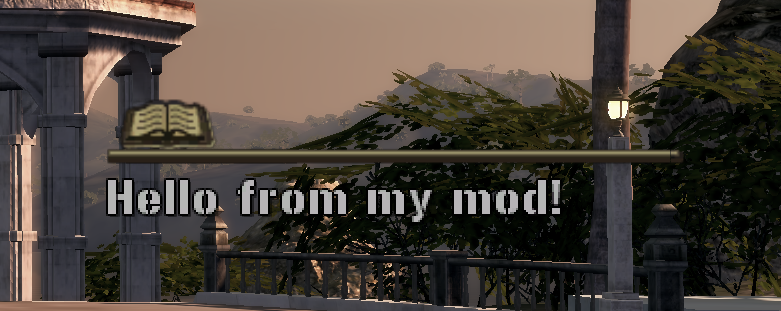
There’s no auto-hide timer — the message stays up until something explicitly clears it:
MrxTutorialManager.HideMessage()
Confirmed working — clears it immediately.
Two more arguments exist on both functions — ShowMessage(sMessage, bDontNetSync, sIdentifierName) / HideMessage(bDontNetSync, sIdentifierName):
sIdentifierName— an arbitrary string tag. Confirmed working by live testing: if you show a message tagged"test1", aHideMessagecall with a different (or missing) identifier won’t clear it — only a matching identifier does. Useful if more than one script might want to show a message around the same time and you don’t want them clearing each other’s.MrxTutorialManager.ShowMessage("Message A", false, "test1") MrxTutorialManager.HideMessage(false, "wrong_id") -- does NOT clear it MrxTutorialManager.HideMessage(false, "test1") -- clears itbDontNetSync— per source, when this isfalse/omitted and you’re the server/host, the message also broadcasts to your co-op partner via a network event;truekeeps it local-only. Not tested — confirming the actual network behavior needs a second player, the same limitation as the co-op tether snippet idea. The single-player behavior (shown above) doesn’t depend on this argument either way.
One more thing worth knowing about the icon: the built-in tutorials (swimming, low fuel, etc.) each show a specific icon — a d-pad, a joystick, a running figure — but that icon isn’t a parameter to ShowMessage at all. Checking one of those tutorials’ source directly, its message is just a localization string key (e.g. "[Tutorial.Swimming]"), not raw text — the icon is baked into whatever that key resolves to in the string table, which this wiki doesn’t have access to. Our plain-text test rendered a generic book icon instead, which is presumably the default when no icon tag is present. There’s no known way to choose a different icon for a custom message.
Show a clean, centered toast notification
A plain-text, icon-free popup using the engine's own EventFanfare system.
A different, simpler-looking popup than the tutorial-hint one above — no icon, no gold header, just plain text centered on screen, using the engine’s own EventFanfare system (see Hud: EventFanfare sType catalog and the custom toast trick for the full story of how this was found):
import("MrxGuiHudMessage")

MrxGuiHudMessage._tEventTextures.custom = "this_texture_does_not_exist"
Hud.EventFanfare:Commence({sType = "custom", vText = "Whatever message I want!"})
Confirmed working by live testing — the import/table-write only needs to happen once (an OnLoad or OnBoot script is a good place for it); after that, any later script can just call Hud.EventFanfare:Commence({sType = "custom", vText = "..."}) on its own. Multiple calls queue up and play one after another automatically rather than overlapping — the same fanfare queue every built-in fanfare variant shares.
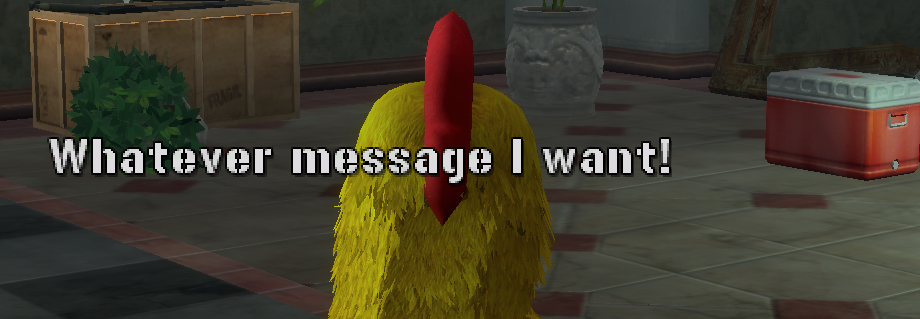
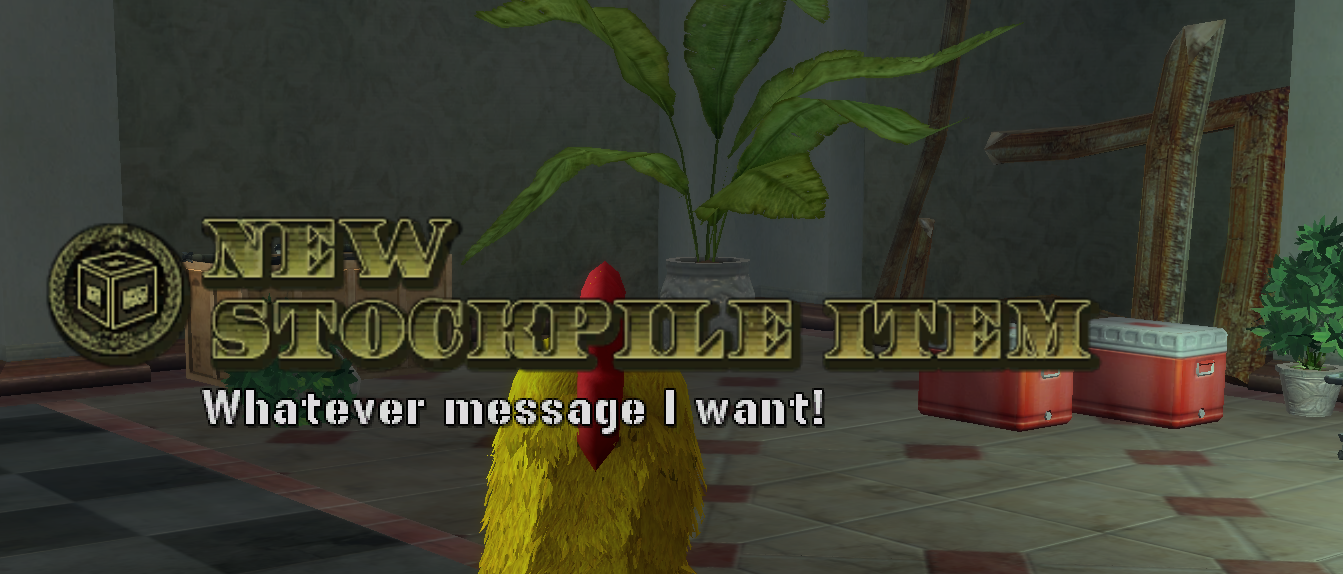
One nuance confirmed while testing this: reusing the exact name of a texture that’s already loaded (e.g. "unlockables_newstockpileitem") makes a real icon and a gold header appear — but the header text shown is that texture’s own built-in title, not anything customizable from here. Stick to a made-up name that doesn’t match any real texture if you want the clean, text-only look.
A dangerous vehicle speed boost (irreversible once started)
A joke script that permanently shoves your current vehicle forward — no off switch.
A silly one — repeatedly shoves whatever vehicle you’re currently riding in forward with a physics impulse, scaled to the vehicle’s own mass:
function StartSpeedBoost()
  UpdateSpeedBoost()
end

function UpdateSpeedBoost()
  local uPlayerChar = Player.GetLocalCharacter()
  if uPlayerChar then
    local uVehicle = Vehicle.GetFromRider(uPlayerChar)
    if uVehicle and Object.IsAlive(uVehicle) then
      -- Optional: only apply boost if the player is pressing the gas/moving
      local currentSpeed = Object.GetVelocity(uVehicle)
      if currentSpeed > 1.0 then
        -- Apply a forward impulse (adjust the Z component to change the push force)
        local myMass = Object.GetMass(uVehicle) or 1000
        Object.ApplyImpulse(uVehicle, 0, 0, 30 * myMass, true)
      end
    end
  end
  -- Reschedule this update function to run every 200ms (0.2 seconds)
  Event.Create(Event.TimerRelative, {0.2}, UpdateSpeedBoost)
end

StartSpeedBoost()
Warning: you cannot turn this off. UpdateSpeedBoost reschedules itself via Event.TimerRelative forever, with no active/inactive flag checked anywhere — unlike the toggleable OnKey scripts elsewhere in this wiki, there’s no second button press that cancels it. Once it’s running, it keeps shoving whatever vehicle you’re in every 0.2 seconds for the rest of the session. Running this a second time doesn’t reset or replace the first loop either — it just adds a second, independent boost loop stacking on top of the first, making things worse, not better. Short of reloading the level (or the whole game), the only way out is getting the vehicle destroyed or getting out of it entirely — and even then, the loop keeps running in the background, ready to grab the next vehicle you enter.
Treat this as a joke/stress-test snippet, not something to actually drive with.
Gating the speed boost behind a held key
The same boost, but only while a key (Shift) is actually held.
The Loader.IsKeyDown(vk) function (a lua-bridge addition, not part of the game itself — see the lua-bridge API section) turns the joke above into something actually controllable: one line makes the boost only apply while a key is physically held down, rather than running unconditionally forever.
function StartSpeedBoost()
  UpdateSpeedBoost()
end

function UpdateSpeedBoost()
  local uPlayerChar = Player.GetLocalCharacter()
  if uPlayerChar then
    local uVehicle = Vehicle.GetFromRider(uPlayerChar)
    if uVehicle and Object.IsAlive(uVehicle) then
      local VK_SHIFT = 0x10
      if Loader.IsKeyDown(VK_SHIFT) then
        local currentSpeed = Object.GetVelocity(uVehicle)
        if currentSpeed > 1.0 then
          local myMass = Object.GetMass(uVehicle) or 1000
          Object.ApplyImpulse(uVehicle, 0, 0, 30 * myMass, true)
        end
      end
    end
  end
  Event.Create(Event.TimerRelative, {0.2}, UpdateSpeedBoost)
end

StartSpeedBoost()
Only one line changed — if Loader.IsKeyDown(VK_SHIFT) then around the impulse. The background loop still reschedules itself forever exactly like the unrestricted version above (same caveat: running this twice stacks a second independent loop, not a replacement), but its effect is now fully in your control — release Shift and the pushing stops immediately, because the impulse simply doesn’t get applied on ticks where the key isn’t held.
A “while key is held” loop template
A bare template for code that runs every tick while a key is held down.
The same Loader.IsKeyDown + self-rescheduling Event.TimerRelative combination above is a genuinely useful general-purpose building block on its own, worth having as a bare template: “run my code repeatedly, for as long as a key stays held” — distinct from OnKey, which only fires once per press, not continuously while held.
local VK_SPACE = 0x20  -- pick any virtual-key code you want to watch

function CheckHeldKeyLoop()
  if Loader.IsKeyDown(VK_SPACE) then
    -- Put your code here! This runs repeatedly, on every tick, for as long as
    -- the key stays held down -- not just once on the initial press.
    Loader.Printf("[mymod] space is currently held")
  end

  Event.Create(Event.TimerRelative, {0.2}, CheckHeldKeyLoop)
end

CheckHeldKeyLoop()
A few things worth understanding about the timing here, since it’s easy to get wrong assumptions about:
{0.2}is how often this loop re-checks the key — 5 times a second. Lower it (e.g.{0.05}) for snappier response, at the cost of more log spam and slightly more CPU use; raise it (e.g.{0.5}) if you don’t need fast response and want things quieter. There’s nothing special about0.2— it’s a reasonable default, not a required value.- This is deliberately coarser than lua-bridge’s own input polling —
OnKeyitself polls at 30Hz, andLoader.PopKeyEvents()(see lua-bridge API: Loader) samples at ~60Hz specifically for cases that can’t afford to miss a keystroke, like typed text. A plainEvent.TimerRelativeloop like this is the right tool when “check a few times a second” is good enough — true for most simple “while held, do X” effects — not when you need frame-tight timing.Loader.IsKeyDownitself is instantaneous (a single, cheap call) — the0.2interval is entirely about how often you choose to ask, not any limitation of the function being called. - One real caveat carried over from the freecam deep dive:
Event.TimerRelativeis gated on the game’s own simulation time, so a loop built this way stops rescheduling entirely if the world gets paused for any reason. Not a problem for most normal gameplay use, but worth knowing if an effect built this way mysteriously seems to “freeze.” - Pick any key you want —
VK_SPACE(0x20) is just the example here. Swap in any Windows virtual-key code; see Your First Mod’s link to Microsoft’s own reference for the full list.
Trigger the “Dance” easter egg animation
Play the "technoviking" dance animation used by the (apparently disabled) Dance radio prop.
resident/danceradio.lua defines a “Dance” radio prop meant to let a nearby character bust out a dance move on use — but its real OnActivate is a no-op stub in the shipped game; only an old, unused OnActivateOld actually wires up the context action and loads the asset. Looks like disabled/cut content. The animation itself is still directly reachable, though:
local uChar = Player.GetLocalCharacter()
Pg.LoadAsset("player_mattias_bare_technoviking", "animation")
Human.PlayRawAnimation(uChar, "player_mattias_bare_technoviking", false, false, 0, false)
Confirmed working by live testing, bound to a local KEYVAL = "pageup" OnKey script. The animation name is hardcoded to Mattias in the original source regardless of who plays it — the base game’s own (disabled) code calls it the same unconditional way — so it’s untested whether it looks right played on Chris or Jennifer specifically.
Remove map boundaries
Lift every out-of-bounds restriction, for every connected player at once.
Certain areas are gated behind invisible boundary volumes attached to each player (see Player — the AddBoundary/RemoveBoundary/RemoveAllBoundary/IsBoundaryDeath family; whether crossing one warns, forces a turn-back, or kills outright depends on how that specific boundary was set up). This clears every boundary currently active on every connected player, co-op safe:
for _, p in ipairs(Player.GetAllPlayers()) do
    Player.RemoveAllBoundary(p)
end
This only clears what’s active right now — it doesn’t disable the boundary system itself, so the game’s own scripts can still add a new boundary later (e.g. on a mission or area transition).
Warp into any HQ interior and back out
GoInside(sWhich) / GoOutside(x,y,z) — into any faction's walkable HQ office, and back.
The 4 faction offices are worldentity templates spawned onto one shared hidden island {3750, 450, -3840}; the PMC HQ has its own dedicated entry instead. Full mechanism, every live-confirmed coordinate, and the reasoning behind the async-wait below: Getting Into Interior Spaces.
-- GoInside(sWhich) / GoOutside(x,y,z) — warp into any HQ interior and back out.
-- The 4 faction offices are worldentity templates spawned onto one shared hidden
-- island {3750,450,-3840}; the PMC HQ has its own packaged entry. All confirmed in-engine.
-- Names: "pmc", "oil"/"oc", "allied", "china"/"chi", "guerrilla"/"gur" (or a raw *Hq_Interior template).

local HQ = { oil="OilHq_Interior", oc="OilHq_Interior", allied="AllHq_Interior",
             china="ChiHq_Interior", chi="ChiHq_Interior", guerrilla="GurHq_Interior", gur="GurHq_Interior" }

function GoInside(sWhich)
  sWhich = string.lower(sWhich or "pmc")
  WifVzBoundary.SetInteriorMode(true)
  if sWhich == "pmc" then
    _MODULES.wifpmcinterior.Enter(true, 1)               -- PMC mansion: its own module loads + teleports
    return
  end
  local old = Pg.GetGuidByName("HqInterior")              -- offices share one slot, so clear the last one
  if old and Object.IsValid(old) then Object.Remove(old) end
  _MODULES.mrxhq.GlobalEnter(false)                       -- HUDs off, interior atmosphere, invincible
  MrxUtil.SpawnActor(HQ[sWhich] or sWhich, "HqInterior", {3750, 450, -3840}, nil, 0, false, false, function()
    MrxUtil.TeleportHeroesToHardpoints({{ vObject = Pg.GetGuidByName("HqInterior"), sHardpoint = "hp_playerA_enter" }})
  end)                                                     -- teleport in the callback: SpawnActor is ASYNC
end

function GoOutside(x, y, z)
  WifVzBoundary.SetInteriorMode(false)
  if _MODULES.mrxhq then _MODULES.mrxhq.GlobalExit() end   -- restore HUDs / faction reporting
  local hq = Pg.GetGuidByName("HqInterior")
  if hq and Object.IsValid(hq) then Object.Remove(hq) end  -- despawn the office actor
  DebugTeleport(x or 2551, y or -14, z or -911)            -- default: back to the open-world start
end
Call GoInside("oil")/GoInside("allied")/etc. to enter an office, GoInside("pmc") for the mansion, and GoOutside() (or GoOutside(x, y, z) for a specific spot) to leave. Worth knowing about the one real trap here: MrxUtil.SpawnActor is asynchronous, so teleporting before the spawned office’s collision has actually streamed in drops you through the floor. This snippet teleports directly inside SpawnActor’s own callback, reported working as-is — but the deep dive above documents a more cautious variant for the same problem that doesn’t teleport in the callback at all: it polls Pg.GetGuidByName("HqInterior") until the actor resolves (roughly another 1.5s beyond the callback firing, for collision specifically) and only teleports after that. If this simpler version ever drops you through the floor, that polling version is the fallback fix.
Custom ordnance & nuke drop system
A tunable multi-ordnance dropper — shells, bombs, and nukes — contributed by @Badga666 (Discord).
Shared by community member @Badga666 on the project’s Discord — first as a written tuning guide, then the actual script itself. This wiki hasn’t independently re-tested it in-game — treat the specific ranges/values below as their own reported tuning experience, not wiki-confirmed fact, the same way any other community contribution is flagged per Contributing. The code below is quoted as given (-- Ess v0.3.0 per its own header comment), not rewritten.
How it’s built, in the contributor’s own words:
- Replaced
ctx:hintwithEss.Easy.Toastand wrapped engine calls inEss.Safe.callto catch silent ordnance failures instead of failing invisibly. - Reasoned that
"impact"-triggered raw spawns ignore terrain, so every call here arms on"distance"instead — detonating after the projectile travels a set number of world units. (Note: the"IMPACT"string that shows up in the menu entries below is a different thing — see thefxTyperow below.) - Reverse-engineered
mrxfuelairbomb.luaandmrxbunkerbuster.luato replicate the official callback chains —Ess.Loopschedules fuel-cloud ignition, submunition scattering, and delayed shockwaves to land when the projectile would naturally detonate. - Spawn height (
height) is decoupled from detonation height (fxAlt): explosions lock topy + fxAlt(player Y plus an offset) for a ground-hugging blast regardless of spawn altitude or terrain slope. - Nukes run through their own
dropNukes()/spawnNuke(), separate from the shared, tunable spawner every other ordnance type routes through — aims withEss.Player.viewYaw(0)(falling back to the body yaw,Ess.Object.yaw, if no view yaw is available), matching theuseViewpattern documented on Identity & World Query.
The actual script, menu wiring included:
-- ==========================================
-- ORDNANCE DROPS CATEGORY (Ess v0.3.0)
-- FX Altitude tuned to 2-10m above player level
-- ==========================================

-- Nuke-specific spawner (UNCHANGED)
local function spawnNuke(tx, tz, ty, burstDist)
  local ok = Ess.Safe.call(function()
    Airstrike.SpawnOrdnance("Nuclear Bunker Buster Projectile", tx, ty, tz, 0, -90, 0, "distance", burstDist)
  end)
  if not ok then return false end

  local loopId = "NukeSeq_" .. tostring(math.random(1000,9999))
  Ess.Loop.start(loopId, 0.2, function()
    local detY = math.max(0, ty - burstDist)
    Ess.Safe.call(function() Pg.Spawn("global_particle_airstrike_tactnuke", tx, detY, tz) end)
    return false
  end)

  local shockId = "NukeShock_" .. tostring(math.random(1000,9999))
  Ess.Loop.start(shockId, 1.0, function()
    local detY = math.max(0, ty - burstDist)
    Ess.Safe.call(function() Pg.Spawn("global_particle_exp_shockwave_ground_tactnuke", tx, detY, tz) end)
    return false
  end)
  return true
end

local function dropNukes(ctx, ringMode)
  local uChar = Ess.Player.character(0)
  if not uChar then Ess.Easy.Toast("No player found"); return end

  local px, py, pz = Ess.Object.pos(uChar)
  local pYaw = Ess.Player.viewYaw(0) or Ess.Object.yaw(uChar)

  local radius = 120
  local height = 60
  local burstDist = 100

  if ringMode then
    local success = true
    for i = 1, 8 do
      local angle = (i - 1) * (2 * math.pi / 8)
      local tx = px + math.sin(pYaw + angle) * radius
      local tz = pz + math.cos(pYaw + angle) * radius
      if not spawnNuke(tx, tz, py + height, burstDist) then success = false end
    end
    if success then Ess.Easy.Toast("Nuke Ring Armed (8x)") end
  else
    local tx, tz = Ess.Math.pointAhead(px, pz, pYaw, radius)
    if spawnNuke(tx, tz, py + height, burstDist) then Ess.Easy.Toast("Nuke Dropped") end
  end
end

-- Generic ordnance spawner with ground-locked FX
local function dropOrdnance(ctx, name, radius, height, triggerType, triggerVal, velocity, fxType, fxAlt)
  fxAlt = fxAlt or 7
  local uChar = Ess.Player.character(0)
  if not uChar then Ess.Easy.Toast("No player found"); return end

  local px, py, pz = Ess.Object.pos(uChar)
  local pYaw = Ess.Player.viewYaw(0) or Ess.Object.yaw(uChar)

  local tx, tz = Ess.Math.pointAhead(px, pz, pYaw, radius)
  local ty = py + height

  local ok = Ess.Safe.call(function()
    Airstrike.SpawnOrdnance(name, tx, ty, tz, 0, velocity, 0, triggerType, triggerVal)
  end)

  if not ok then Ess.Easy.Toast("Spawn failed: " .. name); return end

  -- Detonation timing based on travel
  local detTime = triggerVal / math.abs(velocity)
  -- FX height locked to player level + offset (2-10m)
  local detY = py + fxAlt

  local seqId = "OrdSeq_" .. tostring(math.random(10000,99999))
  Ess.Loop.start(seqId, detTime, function()
    if fxType == "FAB" then
      Ess.Safe.call(function() Pg.Spawn("global_particle_airstrike_fuelairbomb", tx, detY, tz) end)

      local ignId = "FABIgn_" .. tostring(math.random(1000,9999))
      Ess.Loop.start(ignId, 1.6, function()
        Ess.Safe.call(function() Pg.Spawn("Light_airstrike_fuelairbomb_sml", tx, detY, tz) end)
        Ess.Safe.call(function() Pg.Spawn("global_particle_exp_falling_debris_airstrike", tx, detY, tz) end)
        Sound.CueSound(0, "exp_oiltrucker")
        return false
      end)

      local fireId = "FABFire_" .. tostring(math.random(1000,9999))
      Ess.Loop.start(fireId, 1.75, function()
        Ess.Safe.call(function() Pg.Spawn("Explosion (Fuel Air Bomb)", tx, detY, tz) end)
        Ess.Safe.call(function() Pg.Spawn("Light_airstrike_fuelairbomb_lrg_flash", tx, detY, tz) end)
        Ess.Safe.call(function() Pg.Spawn("global_particle_exp_shockwave_ground", tx, detY, tz) end)
        return false
      end)

    elseif fxType == "CLUSTER" then
      for i = 1, 6 do
        local a = (i - 1) * (2 * math.pi / 6)
        local cx = tx + math.sin(a) * 12
        local cz = tz + math.cos(a) * 12
        Ess.Safe.call(function() Pg.Spawn("Explosion (Bombing Run)", cx, detY, cz) end)
      end
      Ess.Safe.call(function() Pg.Spawn("global_particle_exp_shockwave_ground", tx, detY, tz) end)

    else
      Ess.Safe.call(function() Pg.Spawn("Explosion (Bombing Run)", tx, detY, tz) end)
      Ess.Safe.call(function() Pg.Spawn("global_particle_exp_shockwave_ground", tx, detY, tz) end)
    end
    return false
  end)

  Ess.Easy.Toast("Dropped: " .. name)
end

-- Menu Category
menu:category("Ordnance Drops", function(ctx)
  ctx:entry("Tactical Nuke (Single)", function() dropNukes(ctx, false) end)
  ctx:entry("Tactical Nuke (Ring 8x)",function() dropNukes(ctx, true) end)

  -- fxAlt parameter added (last arg): sets detonation height relative to player Y
  ctx:entry("Fuel Air Bomb",          function() dropOrdnance(ctx, "Fuel Air Bomb Projectile", 60, 80, "distance", 70, -90, "FAB", 8) end)
  ctx:entry("Cluster Bomb",           function() dropOrdnance(ctx, "Cluster Bomb Projectile", 70, 90, "distance", 80, -90, "CLUSTER", 2) end)

  ctx:entry("Gunship Shell",          function() dropOrdnance(ctx, "Gunship Shell", 40, 30, "distance", 40, -90, "IMPACT", 2) end)
  ctx:entry("Heavy Artillery",        function() dropOrdnance(ctx, "Artillery Shell", 50, 40, "distance", 50, -90, "IMPACT", 2) end)
end)
spawnNuke/dropNukes use Airstrike.SpawnOrdnance("Nuclear Bunker Buster Projectile", ...) directly, with a real, layered particle sequence: an immediate global_particle_airstrike_tactnuke puff, then a ground shockwave (global_particle_exp_shockwave_ground_tactnuke) one second later, both floored at world Y 0 (math.max(0, ty - burstDist)) so a nuke armed over open sky doesn’t detonate its FX underground. The ring mode spaces 8 nukes around the player with a manual sin/cos loop rather than Ess.Math.pointAhead (pointAhead only projects a single forward direction; a full ring needs an angle offset per nuke), while the single-nuke path and dropOrdnance both use pointAhead directly, matching the description below.
dropOrdnance defaults fxAlt to 7 when the caller omits it (fxAlt = fxAlt or 7) — none of the four menu entries above actually omit it, but it’s there if you add a fifth. Note the parameter reference below was written from the contributor’s prose guide before this script was shared; the table’s 2–8 range matches the four real calls above, while the script’s own header comment claims a wider 2–10m — both are given here rather than silently picking one.
| Parameter | What it does | How to tweak | Reported range |
|---|---|---|---|
name | Projectile template string, passed straight to Airstrike.SpawnOrdnance | Match your build’s ordnance names | "Gunship Shell", "Artillery Shell", "Fuel Air Bomb Projectile", "Cluster Bomb Projectile" (nukes separately use "Nuclear Bunker Buster Projectile") |
radius | Horizontal distance from player to drop zone | Lower = closer blasts, higher = safer distance | 30–120 (40–70 across the four real menu entries) |
height | Spawn altitude above player Y | Higher = longer drop time (raise triggerVal to match) | 30–100 (30–90 across the four real menu entries) |
triggerType | Arming method, passed straight to Airstrike.SpawnOrdnance | The contributor’s notes call "impact" unreliable (ignores terrain) and "timer" viable; every real call in this script uses "distance" — no example of the other two exists here | "distance" |
triggerVal | Arming threshold — units traveled before detonation, for "distance" | Raise it if the projectile detonates before reaching the ground | 40–120 (40–80 across the four real menu entries) |
velocity | Downward drop speed (negative = falling), passed straight to Airstrike.SpawnOrdnance | Lower number = faster dive; keep proportional to height | Every real call here uses exactly -90 |
fxType | Not an engine parameter — a plain string this script’s own if/elseif branches on to pick which FX chain plays. "IMPACT" (the else branch — same string shape as the unrelated engine triggerType concept above, easy to conflate but not connected to it) plays a single Explosion (Bombing Run) + shockwave; "FAB" plays the staged fuel-air sequence; "CLUSTER" rings 6 Explosion (Bombing Run)s around the impact point | Match the ordnance type | "IMPACT", "FAB", "CLUSTER" |
fxAlt | Detonation altitude above player Y (detY = py + fxAlt) | Lower = ground-hugging, higher = airburst | Defaults to 7; 2–8 in the real calls above; the script’s own header comment says 2–10 |
Nukes use a separate function, dropNukes(ctx, ringMode), tuned via locals inside it:
| Parameter | Default | Effect |
|---|---|---|
radius | 120 | Ring diameter from player |
height | 60 | Spawn altitude above player |
burstDist | 100 | Travel distance before arming/detonation |
The math behind it, per the contributor:
- Detonation timing:
detTime = triggerVal / math.abs(velocity)— e.g.triggerVal = 80,velocity = -90gives roughly a 0.89s delay before FX fire. - FX altitude:
detY = py + fxAlt— withfxAlt = 2, explosions lock to exactly 2 units above your feet. - Both placements share the engine’s
x = sin(yaw), z = cos(yaw)convention (see Ess.Math for the same convention documented elsewhere on this wiki). A single target (dropOrdnance, the single-nuke path) gets it for free fromEss.Math.pointAhead(); the 8-nuke ring needs a per-nuke angle offsetpointAheaddoesn’t expose, so that one loop applies the samesin/cosby hand instead.
Tuning tips, from the contributor’s own notes:
- Explosions too high or low? Adjust only
fxAlt— leaveheightalone unless you also want to change drop travel time. - Projectile detonating before it reaches the ground? Raise
triggerValby10–20. - Fuel-air-bomb cloud not forming? Raise
heightto80–100andfxAltto6–8— FABs reportedly need altitude to disperse before ignition. - Cluster submunitions clumping together? Raise
triggerValto give the engine more frames to process the scatter logic. - FX out of sync with the blast? Adjust the
detTimedivisor, or add a+0.2buffer to theEss.Loop.start()delay. - Testing a new ordnance type? Start from
"distance"triggering,velocity = -90,fxAlt = 3, then tune from there.
Ready for something more involved?
Everything above reads or writes a value. Deep Dive: Overriding a Function walks through the next step up — replacing a piece of the game’s own logic — end to end, including the wrong turns along the way. The result of that case study is also available as a ready-to-use script under OnLoad Scripts.
Something not here?
If you worked out a useful snippet that isn’t listed, it’s worth adding — this page is meant to grow.