OnKey Scripts
Complete .lua files meant to be dropped into scripts/OnKey/ — see Getting Started for how OnKey binding/KEYVAL works if you haven’t read that yet.
OpenCheatMenu.lua — Opens the game's own dev cheat menu with a single hotkey press.
The whole entry point of MrxCheatBootstrap is one call, _G.Cheat.DisplayOptions() — this just wires it to a hotkey instead of typing it into the console every time.
local KEYVAL = "f2"  -- must be in the first 10 lines -- pick any key you like, see the note below

_G.Cheat.DisplayOptions()
Confirmed working — this reuses the exact _G.Cheat.DisplayOptions() call already live-tested on the MrxCheatBootstrap page; wiring it to OnKey doesn’t change its behavior, just when it fires.
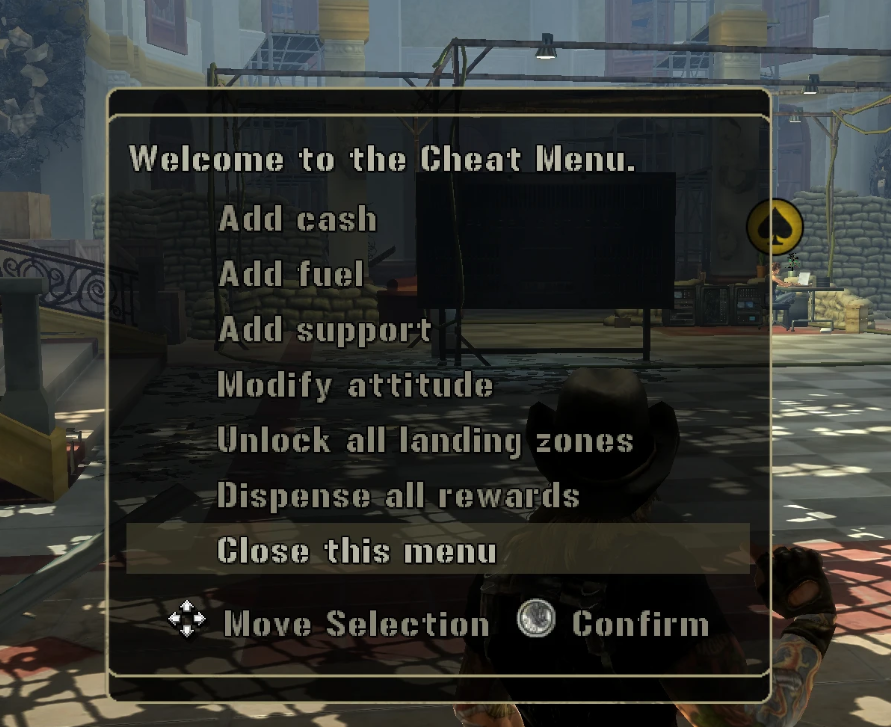
Picking a different key: KEYVAL (or the matching entry in lua_loader.ini’s [OnKey] section) needs a recognized key name — see Your First Mod for the mechanics of how KEYVAL gets picked up. For the full list of valid Windows virtual-key names/codes to choose from, see Microsoft’s own reference: Virtual-Key Codes (this is the same link the loader’s own auto-generated lua_loader.ini points you to).
ConsoleCheatsMenu.lua — A custom menu recreating the classic console-release D-pad cheat codes (fill fuel, give all airstrikes/supplies/vehicles, infinite ammo, invincibility, unlock costumes/grapple) as a single hotkey menu.
The original D-pad button-sequence cheat codes from the console releases aren’t implemented in Lua anywhere in this corpus — they’re native/engine code, unreachable from here. Rather than trying to recreate D-pad sequence detection from scratch, this just puts the same effects behind a MrxMultiPageMenu-based menu, the same UI pattern MrxCheatBootstrap itself uses, triggered by a hotkey instead of a button sequence.
local KEYVAL = "f3"  -- must be in the first 10 lines

import("MrxMultiPageMenu")
import("MrxPmc")
import("MrxSupportData")

local function GiveAllOfType(sType, nQty, sExcludeKey)
  for sKey, tData in pairs(MrxSupportData.tSupportData) do
    if tData.sType == sType and sKey ~= sExcludeKey then
      MrxPmc.AddSupportQty(sKey, nQty)
    end
  end
end

local function GiveAllVehicles()
  for sKey, tData in pairs(MrxSupportData.tSupportData) do
    if tData.sType ~= "Supply" and tData.sType ~= "Airstrike" then
      MrxPmc.AddSupportQty(sKey, 25)
    end
  end
end

local function FillFuel()
  MrxPmc.AddFuelQty(MrxPmc.GetFuelCapacity() - MrxPmc.GetFuelQty())
end

local function UnlockAllCostumes()
  import("WifPmcInterior")
  import("MrxUtil")
  local sHero = MrxUtil.GetCharacterIdentity(Player.GetPrimaryCharacter())
  local tMerged = {}
  for sOtherHero, tList in pairs(WifPmcInterior._tOutfits) do
    for _, tOutfit in ipairs(tList) do
      table.insert(tMerged, tOutfit)
    end
  end
  WifPmcInterior._tOutfits[sHero] = tMerged
  WifPmcInterior.GetAvailableCostumes = function()
    return table.getn(WifPmcInterior._tOutfits[sHero])
  end
end

MrxMultiPageMenu.Reset()
MrxMultiPageMenu.AddOption("Fill Fuel", FillFuel)
MrxMultiPageMenu.AddOption("Give All Airstrikes (except nuke)", GiveAllOfType, {"Airstrike", 1, "nuke"})
MrxMultiPageMenu.AddOption("Give All Supplies", GiveAllOfType, {"Supply", 1})
MrxMultiPageMenu.AddOption("Give All Vehicles (25 each)", GiveAllVehicles)
MrxMultiPageMenu.AddOption("Give Nuke (25)", MrxPmc.AddSupportQty, {"nuke", 25})
MrxMultiPageMenu.AddOption("Infinite Ammo", Object.SetInfiniteAmmo, {Player.GetPrimaryCharacter(), true})
MrxMultiPageMenu.AddOption("Invincibility", Object.SetInvincible, {Player.GetPrimaryCharacter(), true, "ConsoleCheatsMenu"})
MrxMultiPageMenu.AddOption("Unlock All Costumes", UnlockAllCostumes)
MrxMultiPageMenu.AddOption("Unlock Grappling Hook", MrxPmc.AddEquipment, {"GrapplingHook"})
MrxMultiPageMenu.AddOption("Close this menu", nil, nil, true, true)
MrxMultiPageMenu.Display("Console Cheats:")
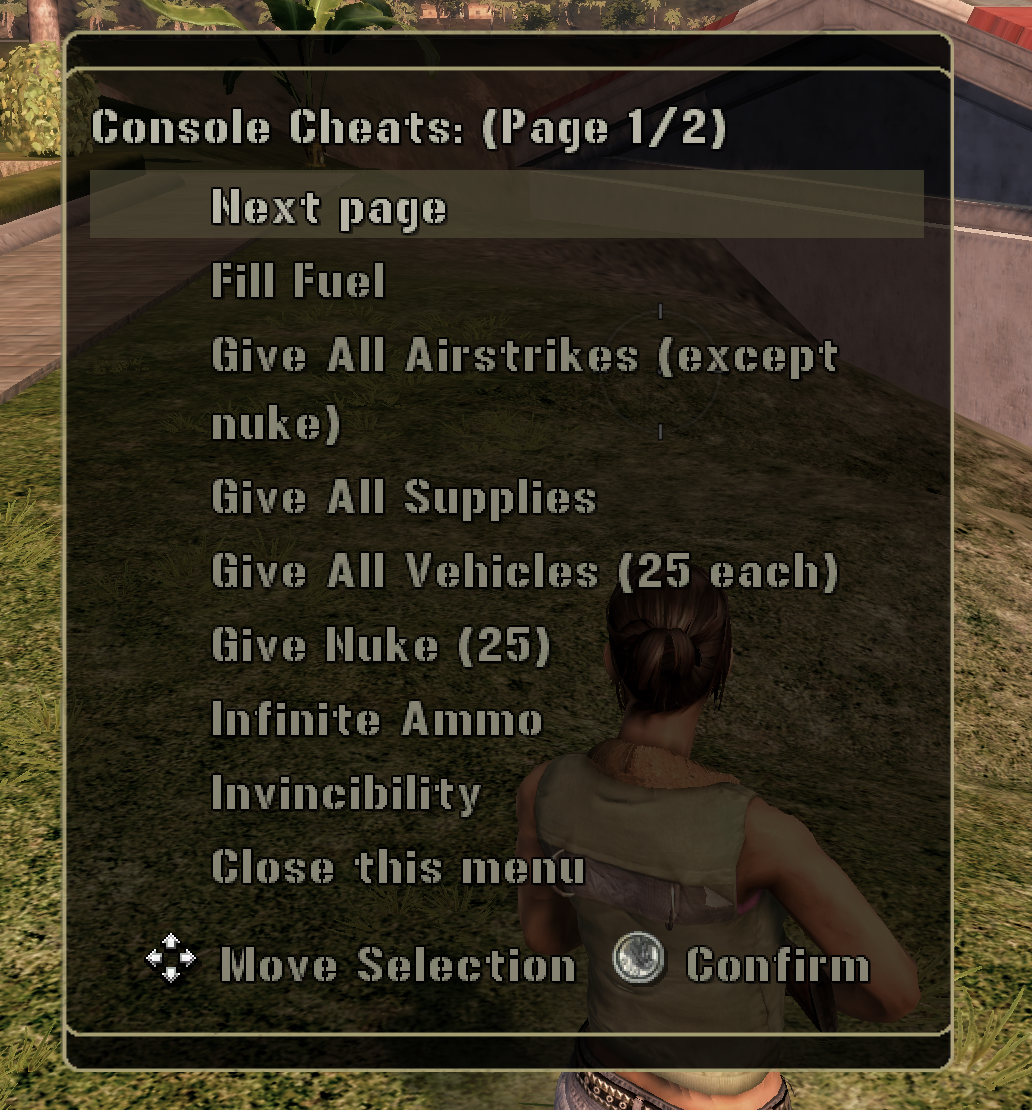
Confirmed working by live testing — including Object.SetInvincible and MrxPmc.AddEquipment (“Unlock Grappling Hook”), the two calls that were only source-confirmed, not fired in-game, as of the first version of this entry.
One known simplification, not a bug: the original codes note “executable by either player, only affects the player who executed it.” This version always targets Player.GetPrimaryCharacter() — resolving “the player who pressed this specific hotkey” in split-screen/co-op hasn’t been figured out yet.
Freecam.lua — A detached, controller-driven flying camera. Left stick moves, right stick looks, d-pad flies up/down.
Prerequisites:
- A controller connected (this reads real analog stick/d-pad input, not keyboard/mouse).
- Open the in-game PDA before pressing the hotkey. The camera hijacks the PDA’s own input handling to get continuous controller data — there’s no other way to read it from Lua. See Deep Dive: Building a Real Freecam for the full why.
How to use it: open the PDA, press f4 to activate, fly around with the sticks/d-pad, press f4 again to deactivate and get the PDA back to normal. The game world is paused the whole time (same as normal PDA behavior) — this is an inspection/screenshot/cinematic-path camera, not a live-gameplay spectator mode.
local KEYVAL = "f4"  -- must be in the first 10 lines

_G.RealFreecam = _G.RealFreecam or {}
local Freecam = _G.RealFreecam
Freecam.active = Freecam.active or false
Freecam.camX = Freecam.camX or 0
Freecam.camY = Freecam.camY or 0
Freecam.camZ = Freecam.camZ or 0
Freecam.camYaw = Freecam.camYaw or 0
Freecam.camPitch = Freecam.camPitch or 0
Freecam.moveSpeed = Freecam.moveSpeed or 60    -- tweak me: forward/strafe speed, world units/sec
Freecam.lookSpeed = Freecam.lookSpeed or 2     -- tweak me: turn/look speed, radians/sec
Freecam.vertSpeed = Freecam.vertSpeed or 60    -- tweak me: d-pad up/down flight speed, world units/sec
Freecam.lookDistance = Freecam.lookDistance or 10  -- tweak me: how far ahead the look-at anchor sits
Freecam.deadzone = Freecam.deadzone or 0.15    -- tweak me: stick deadzone, 0-1 (raise if it drifts when idle)
Freecam.leftX = Freecam.leftX or 0
Freecam.leftY = Freecam.leftY or 0
Freecam.rightX = Freecam.rightX or 0
Freecam.rightY = Freecam.rightY or 0
Freecam.dpadUpHeld = Freecam.dpadUpHeld or false
Freecam.dpadDownHeld = Freecam.dpadDownHeld or false
Freecam.now = Freecam.now or 0
Freecam.leftXAt = Freecam.leftXAt or 0
Freecam.leftYAt = Freecam.leftYAt or 0
Freecam.rightXAt = Freecam.rightXAt or 0
Freecam.rightYAt = Freecam.rightYAt or 0

local PI = 3.14159265

local function normalizeAngle(x)
  local twoPi = 2 * PI
  x = x % twoPi
  if x > PI then x = x - twoPi elseif x < -PI then x = x + twoPi end
  return x
end

-- math.sin/math.cos don't exist in this Lua build -- Taylor-series fallbacks.
-- UPDATE: natively available as of lua-bridge v0.1.6 -- see Stdlib Additions. No longer necessary on an
-- updated build; kept as-is here since it was accurate when written and still works either way.
local function customSin(x)
  x = normalizeAngle(x)
  local x2 = x * x
  return x * (1 - x2 * (0.16666666666667 - x2 * (0.00833333333333 - x2 * 0.000198412698)))
end

local function customCos(x)
  x = normalizeAngle(x)
  local x2 = x * x
  return 1 - x2 * (0.5 - x2 * (0.04166666666667 - x2 * (0.00138888888889 - x2 * 0.000024801587)))
end

local function ApplyDeadzone(n)
  if math.abs(n) < Freecam.deadzone then return 0 end
  return n
end

local function ApplyMovement(dt)
  local uCamera = Player.GetCamera(Player.GetLocalPlayer())
  if not uCamera then return end

  local nLX = ApplyDeadzone(Freecam.leftX)
  local nLY = ApplyDeadzone(Freecam.leftY)
  local nRX = ApplyDeadzone(Freecam.rightX)
  local nRY = ApplyDeadzone(Freecam.rightY)

  Freecam.camYaw = Freecam.camYaw + nRX * Freecam.lookSpeed * dt
  Freecam.camPitch = Freecam.camPitch + nRY * Freecam.lookSpeed * dt
  if Freecam.camPitch > 1.4 then Freecam.camPitch = 1.4 end
  if Freecam.camPitch < -1.4 then Freecam.camPitch = -1.4 end

  local fCos = customCos(Freecam.camYaw)
  local fSin = customSin(Freecam.camYaw)

  Freecam.camX = Freecam.camX + (nLY * fCos - nLX * fSin) * Freecam.moveSpeed * dt
  Freecam.camZ = Freecam.camZ + (nLY * fSin + nLX * fCos) * Freecam.moveSpeed * dt

  if Freecam.dpadUpHeld then Freecam.camY = Freecam.camY + Freecam.vertSpeed * dt end
  if Freecam.dpadDownHeld then Freecam.camY = Freecam.camY - Freecam.vertSpeed * dt end

  if Freecam.uAnchor then
    local fPitchCos = customCos(Freecam.camPitch)
    local ax = Freecam.camX + Freecam.lookDistance * fPitchCos * fCos
    local az = Freecam.camZ + Freecam.lookDistance * fPitchCos * fSin
    local ay = Freecam.camY + Freecam.lookDistance * customSin(Freecam.camPitch)
    Object.SetPosition(Freecam.uAnchor, ax, ay, az)
  end

  Camera.SetPosition(uCamera, Freecam.camX, Freecam.camY, Freecam.camZ, true)
end

local function OnPdaControllerInput(oSelf, tInput)
  local bOk, sErr = pcall(function()
    if not Freecam.lastStamp then
      Freecam.lastStamp = Sys.RealTimeStamp()
      return
    end
    local dt = Sys.TimeStampGetElapsed(Freecam.lastStamp)
    Sys.TimeStampMark(Freecam.lastStamp)
    if not dt then return end

    Freecam.now = Freecam.now + dt

    if tInput.LeftAnalogX ~= nil then Freecam.leftX = tInput.LeftAnalogX; Freecam.leftXAt = Freecam.now end
    if tInput.LeftAnalogY ~= nil then Freecam.leftY = tInput.LeftAnalogY; Freecam.leftYAt = Freecam.now end
    if tInput.RightAnalogX ~= nil then Freecam.rightX = tInput.RightAnalogX; Freecam.rightXAt = Freecam.now end
    if tInput.RightAnalogY ~= nil then Freecam.rightY = tInput.RightAnalogY; Freecam.rightYAt = Freecam.now end
    if tInput.ButtonPress == 1 then Freecam.dpadUpHeld = true end
    if tInput.ButtonPress == 2 then Freecam.dpadDownHeld = true end
    if tInput.ButtonReleased == 1 then Freecam.dpadUpHeld = false end
    if tInput.ButtonReleased == 2 then Freecam.dpadDownHeld = false end

    local nStaleAfter = 0.15
    if Freecam.now - Freecam.leftXAt > nStaleAfter then Freecam.leftX = 0 end
    if Freecam.now - Freecam.leftYAt > nStaleAfter then Freecam.leftY = 0 end
    if Freecam.now - Freecam.rightXAt > nStaleAfter then Freecam.rightX = 0 end
    if Freecam.now - Freecam.rightYAt > nStaleAfter then Freecam.rightY = 0 end

    ApplyMovement(dt)
  end)
  if not bOk then
    Loader.Printf("REALFREECAM: ERROR -> " .. tostring(sErr))
  end
end

local function FindPdaWidget()
  import("MrxGuiBase")
  for k, oWidget in pairs(MrxGuiBase.WidgetIdIndex) do
    local bOk, sName = pcall(function() return oWidget:GetName() end)
    if bOk and sName == "PDA" then return oWidget end
  end
  return nil
end

local function SetPdaVisible(bVisible)
  import("MrxGuiBase")
  for k, oWidget in pairs(MrxGuiBase.WidgetIdIndex) do
    local bOk, sName = pcall(function() return oWidget:GetName() end)
    if bOk and (sName == "PDA" or sName == "PDA Subtitle Buffer") then
      pcall(function() oWidget:SetVisible(bVisible) end)
    end
  end
end

local uPlayer = Player.GetLocalPlayer()
local uCamera = Player.GetCamera(uPlayer)
local uChar = Player.GetLocalCharacter()

if uPlayer and uCamera and uChar then
  Freecam.active = not Freecam.active

  if Freecam.active then
    Loader.Printf("REALFREECAM: activating -- open the PDA now if it isn't already open")

    local oPdaWidget = FindPdaWidget()
    if not oPdaWidget then
      Loader.Printf("REALFREECAM: could not find PDA widget -- is it open?")
      Freecam.active = false
    else
      oPdaWidget:SetEventHandler("ControllerInput", OnPdaControllerInput)
      SetPdaVisible(false)

      local px, py, pz = Object.GetPosition(uChar)
      Freecam.camX, Freecam.camY, Freecam.camZ = px, py + 2, pz
      Freecam.camYaw, Freecam.camPitch = 0, 0
      Freecam.leftX, Freecam.leftY, Freecam.rightX, Freecam.rightY = 0, 0, 0, 0
      Freecam.dpadUpHeld, Freecam.dpadDownHeld = false, false
      Freecam.lastStamp = nil
      Freecam.now, Freecam.leftXAt, Freecam.leftYAt, Freecam.rightXAt, Freecam.rightYAt = 0, 0, 0, 0, 0

      Freecam.uAnchor = Pg.Spawn("Verification Camera", px, py + 2, pz + Freecam.lookDistance)

      Player.SetCinematicMode(uPlayer, true, true)
      Object.SetVisible(uChar, false)
      Object.SetInvincible(uChar, true, "Freecam")

      Camera.Blend(uCamera, 0)
      Camera.SetLookAt(uCamera, Freecam.uAnchor)
      Camera.Hold(uCamera, true, false)
    end
  else
    Loader.Printf("REALFREECAM: deactivating")
    Camera.Hold(uCamera, false, false)
    Object.SetVisible(uChar, true)
    Object.SetInvincible(uChar, false, "Freecam")
    Player.SetCinematicMode(uPlayer, false)
    SetPdaVisible(true)
    if Freecam.uAnchor then
      Object.Remove(Freecam.uAnchor)
      Freecam.uAnchor = nil
    end
  end
end
Confirmed working by live testing. For the full story — three dead-end input systems tried first, five separate engine quirks found and fixed along the way, and why this needs the PDA specifically — see Deep Dive: Building a Real Freecam.
CommonSpawnMenu.lua — A quick-access picker menu for spawning vehicles and props at your position, plus a free-text option for any Pg.Spawn template name.
Built on the same MrxGuiDialogBox system as OpenCheatMenu.lua above — the fixed vehicle list is a plain picker menu, rebuilt fresh on every keypress the same way ConsoleCheatsMenu.lua does above it. The one option that can’t work as a native menu item — “Custom Name…” — opens a small standalone text-entry widget instead, built from the same MrxGuiTextBuffer bug workaround detailed in Building a Chat/Log UI, typed using the lua-bridge Loader API’s keyboard capture — the same input mechanism behind the co-op chat feature — rather than anything reachable in game Lua alone.
Prerequisites: same as co-op chat — requires lua-bridge v0.1.6 or later for the Loader.* input functions (included in the stock install from that version onward).
local KEYVAL = "f5"  -- must be in the first 10 lines -- f2 (OpenCheatMenu), f3 (ConsoleCheatsMenu), f4 (Freecam) are already taken by the other sample OnKey scripts on this wiki

-- Persistent state and widget module, guarded with "or" -- this whole script re-executes on every
-- keypress (OnKey scripts are re-read from disk each press), so a plain table literal here would
-- blow away the console's own widget references and orphan them on screen every time f5 is pressed.
_G.CommonSpawnState = _G.CommonSpawnState or {
  active = false,      -- true while the free-text "Custom Name..." input is open
  buffer = "",
  loopRunning = false, -- true while a CommonSpawnInputLoop chain is actually ticking
}

SpawnConsoleUI = SpawnConsoleUI or {
  logBox = nil,
  inputPreview = nil,
  isVisible = false
}

local VK_BACKSPACE = 0x08
local VK_RETURN = 0x0D
local VK_ESCAPE = 0x1B
local VK_SHIFT = 0x10
local VK_SPACE = 0x20

local nSpawnHeightOffset = 2  -- how far above your own position things spawn -- raise if things spawn stuck in the ground
local nPollInterval = 0.01    -- Loader's key-event buffer fills at ~60Hz; poll faster than that so typing doesn't lag

-- ============================================================
-- VK code -> typed character, shift-aware (template names are case-sensitive
-- and use punctuation, unlike the original co-op chat's uppercase-only input)
-- ============================================================
local tShiftedDigits = {
  [0x30] = ")", [0x31] = "!", [0x32] = "@", [0x33] = "#", [0x34] = "$",
  [0x35] = "%", [0x36] = "^", [0x37] = "&", [0x38] = "*", [0x39] = "("
}

local tPunctuation = {
  [0xBD] = {"-", "_"},  -- hyphen / underscore
  [0xBE] = {".", ">"},  -- period / greater-than
  [0xBC] = {",", "<"}   -- comma / less-than
}

local function VkToChar(nVk, bShift)
  if nVk >= 0x41 and nVk <= 0x5A then
    return bShift and string.char(nVk) or string.char(nVk + 32)
  elseif nVk >= 0x30 and nVk <= 0x39 then
    return bShift and tShiftedDigits[nVk] or string.char(nVk)
  elseif nVk == VK_SPACE then
    return " "
  elseif tPunctuation[nVk] then
    return bShift and tPunctuation[nVk][2] or tPunctuation[nVk][1]
  end
  return nil
end

-- ============================================================
-- Spawn logic
-- ============================================================
function DoSpawn(sTemplateName)
  local uChar = Player.GetLocalCharacter()
  local x, y, z = Object.GetPosition(uChar)

  local bOk, uSpawned = pcall(Pg.Spawn, sTemplateName, x, y + nSpawnHeightOffset, z)
  return bOk and uSpawned
end

-- ============================================================
-- Display: input line + scrolling log, used only while the free-text console is open
-- ============================================================
import("MrxGui")
import("MrxGuiTextBuffer")

function SpawnConsoleUI:Init(x, y, width, height)
  if self.logBox then return true end

  x = x or 20
  y = y or 20
  width = width or 280
  height = height or 120

  self.logBox = MrxGui.ImageWidget:new()
  self.logBox:SetLocation(x, y, x + width, y + height)
  self.logBox.BasicData = self.logBox.BasicData or {}
  self.logBox.BasicData.name = "MessageBox"

  local initFunc = _G.HandleInstantiationEventForTextBuffer or (_G.MrxGuiTextBuffer and _G.MrxGuiTextBuffer.HandleInstantiationEventForTextBuffer)
  if initFunc then
    initFunc(self.logBox, {})
  else
    return false
  end

  self.logBox:SetColor(24, 24, 24)
  self.logBox:SetTranslucency(200)

  local inputHeight = 25
  self.logBox.CustomData.y2 = self.logBox.CustomData.y2 - inputHeight
  self.logBox.CustomData.nHeight = self.logBox.CustomData.nHeight - inputHeight
  self.logBox.CustomData.nRemainingSpace = self.logBox.CustomData.nHeight

  self.inputPreview = MrxGui.TextWidget:new()
  self.inputPreview:SetFont("english_18")
  self.inputPreview:SetText("> _")
  self.inputPreview:SetColor(255, 255, 0)

  local inX1 = x + 10
  local inX2 = x + width - 10
  local inY1 = (y + height) - inputHeight - 5
  local inY2 = (y + height) - 5
  self.inputPreview:SetLocation(inX1, inY1, inX2, inY2)

  if _G.Player and _G.Player.GetLocalPlayer then
    local p = _G.Player.GetLocalPlayer()
    self.logBox:SetOwner(p)
    self.inputPreview:SetOwner(p)
  end

  MrxGui.AddWidget(self.logBox)
  MrxGui.AddWidget(self.inputPreview)

  self.logBox:SetVisible(false)
  self.inputPreview:SetVisible(false)
  self.isVisible = false

  return true
end

function SpawnConsoleUI:Show(bVisible)
  if bVisible and not self.logBox then
    self:Init()
  end

  if not self.logBox or not self.inputPreview then return end

  self.isVisible = bVisible
  self.logBox:SetVisible(bVisible)
  self.inputPreview:SetVisible(bVisible)
end

function SpawnConsoleUI:AddMessage(sMessage)
  if not self.logBox then self:Init() end
  if not self.logBox or not self.logBox.AddMessage then return end

  self.logBox:AddMessage(sMessage, 5, 15, 1, false, true)
  self:Show(true)
end

function SpawnConsoleUI:SetInputText(sText)
  if not self.inputPreview then return end
  self.inputPreview:SetText("> " .. (sText or "") .. "_")
end

function SpawnFromConsole(sTemplateName)
  local bSuccess = DoSpawn(sTemplateName)
  SpawnConsoleUI:AddMessage((bSuccess and "Spawned: " or "Failed: ") .. sTemplateName)
end

-- ============================================================
-- Free-text console open/close + its polling loop. loopRunning means a chain is
-- already ticking somewhere -- reuse it instead of starting a second one.
-- ============================================================
function OpenCustomSpawnInput()
  _G.CommonSpawnState.active = true
  _G.CommonSpawnState.buffer = ""
  Loader.ClearKeyEvents()
  Player.SetInputEnabled(Player.GetLocalPlayer(), false)
  SpawnConsoleUI:Show(true)
  SpawnConsoleUI:SetInputText("")

  if not _G.CommonSpawnState.loopRunning then
    _G.CommonSpawnState.loopRunning = true
    CommonSpawnInputLoop()
  end
end

function CloseCustomSpawnInput()
  _G.CommonSpawnState.active = false
  Player.SetInputEnabled(Player.GetLocalPlayer(), true)
  SpawnConsoleUI:Show(false)
end

function CommonSpawnInputLoop()
  if not _G.CommonSpawnState.active then
    _G.CommonSpawnState.loopRunning = false
    return
  end

  local sEvents = Loader.PopKeyEvents()
  local bShift = Loader.IsKeyDown(VK_SHIFT)
  local bBufferChanged = false

  for i = 1, string.len(sEvents) do
    local nVk = string.byte(sEvents, i)

    if nVk == VK_RETURN then
      local sTemplateName = _G.CommonSpawnState.buffer
      _G.CommonSpawnState.buffer = ""
      SpawnConsoleUI:SetInputText("")
      bBufferChanged = false
      if sTemplateName ~= "" then
        SpawnFromConsole(sTemplateName)
      end
    elseif nVk == VK_ESCAPE then
      CloseCustomSpawnInput()
      break  -- state just changed out from under us -- don't keep processing this batch
    elseif nVk == VK_BACKSPACE then
      _G.CommonSpawnState.buffer = string.sub(_G.CommonSpawnState.buffer, 1, string.len(_G.CommonSpawnState.buffer) - 1)
      bBufferChanged = true
    else
      local sChar = VkToChar(nVk, bShift)
      if sChar then
        _G.CommonSpawnState.buffer = _G.CommonSpawnState.buffer .. sChar
        bBufferChanged = true
      end
    end
  end

  if bBufferChanged then
    SpawnConsoleUI:SetInputText(_G.CommonSpawnState.buffer)
  end

  Event.Create(Event.TimerRelative, {nPollInterval}, CommonSpawnInputLoop)
end

-- ============================================================
-- What this specific f5 press does: close the console if it's open, otherwise
-- show the picker menu (rebuilt fresh each press, same as ConsoleCheatsMenu.lua)
-- ============================================================
if _G.CommonSpawnState.active then
  CloseCustomSpawnInput()
else
  import("MrxGuiDialogBox")
  import("MrxGuiHudMessage")

  MrxGuiHudMessage._tEventTextures.custom = "this_texture_does_not_exist"

  -- Default menu entries. `template` strings are pulled directly from real Pg.Spawn call sites in the
  -- decompiled corpus. "Ambulance" and "El Grande" are confirmed spawnable bare (empty, no driver) --
  -- both appear without a "(Driver)" suffix elsewhere in the corpus (resident/mrxsupportdata.lua's
  -- SetCargo lists, and El Grande also directly in vz/oilcon020.lua's own Pg.Spawn call). "UH1 Transport
  -- (PMC)" has no confirmed bare call site anywhere -- dropping "(Driver)" there is a guess, not a
  -- confirmed fact; if it fails to spawn, put "(Driver)" back on that one specifically.
  local tSpawnMenuOptions = {
    {label = "Veyron (Sports Car)", action = "spawn", template = "Veyron"},
    {label = "ZTZ98 (Tank)", action = "spawn", template = "ZTZ98"},
    {label = "UH1 Transport (Helicopter)", action = "spawn", template = "UH1 Transport (PMC)"},
    {label = "Ambulance", action = "spawn", template = "Ambulance"},
    {label = "El Grande (Truck)", action = "spawn", template = "El Grande"},
    {label = "M35 Cargo Truck", action = "spawn", template = "M35 (Cargo) (VZ)"},
    {label = "Grenade Explosion", action = "spawn", template = "Explosion (Grenade)"},
    {label = "Custom Name...", action = "custom"},
    {label = "Cancel", action = "cancel"},
  }

  local function OnSpawnMenuSelect(nSelectedIndex)
    local tEntry = tSpawnMenuOptions[nSelectedIndex]
    if not tEntry then return end

    if tEntry.action == "spawn" then
      local bSuccess = DoSpawn(tEntry.template)
      Hud.EventFanfare:Commence({sType = "custom", vText = (bSuccess and "Spawned: " or "Failed: ") .. tEntry.template})
    elseif tEntry.action == "custom" then
      OpenCustomSpawnInput()
    end
    -- "cancel" falls through and does nothing
  end

  local tLabels = {}
  for i, tEntry in ipairs(tSpawnMenuOptions) do
    tLabels[i] = tEntry.label
  end

  -- bPause=true matches how the game's own menus behave; untested whether pausing here
  -- has any side effect on a connected co-op partner -- flip to false if that matters to you
  MrxGuiDialogBox.DisplayDialogBox(
    Player.GetLocalPlayer(),
    "Common Spawn",
    tLabels,
    1,
    OnSpawnMenuSelect,
    {},
    nil, nil, nil, nil,
    true,
    #tSpawnMenuOptions
  )
end
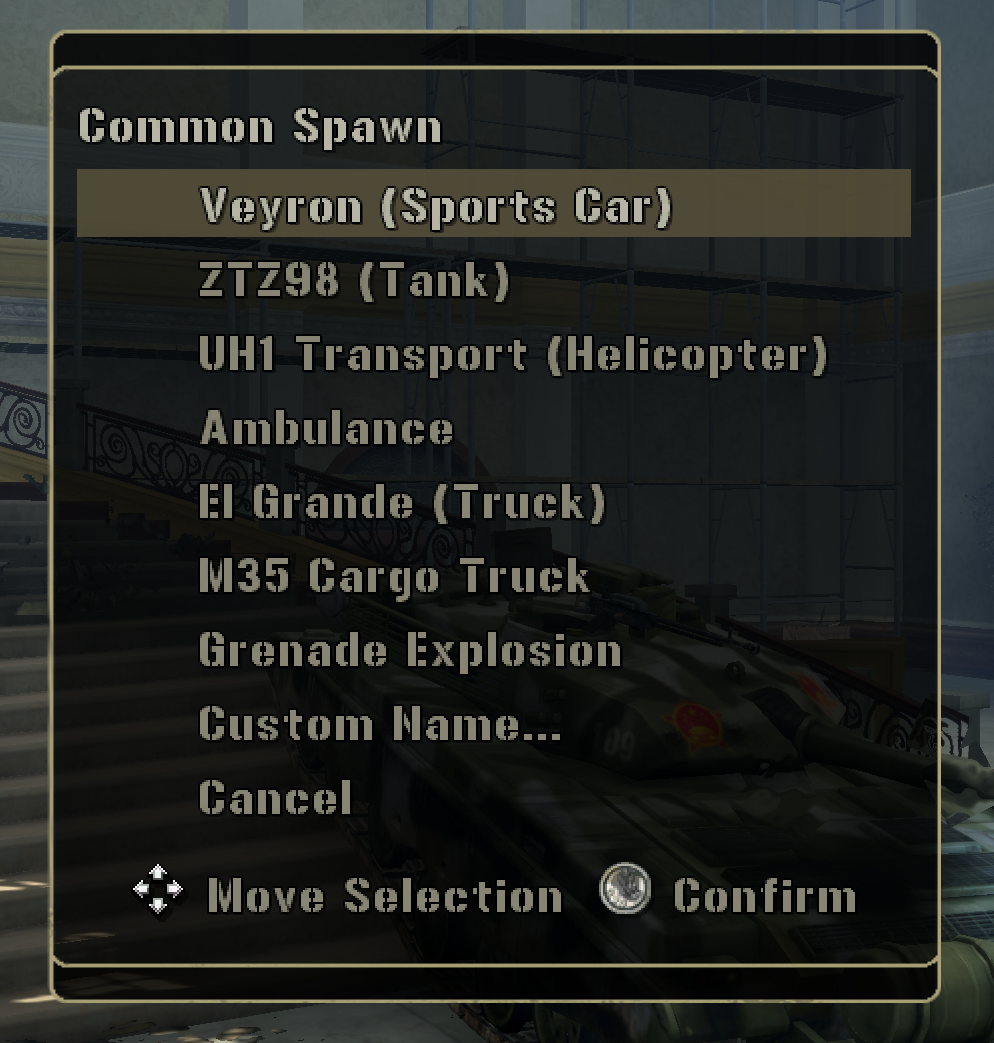
Confirmed working by live testing — every menu option spawns correctly, and the free-text console correctly captures typed characters (including shifted/punctuation ones) and spawns whatever template name is entered.
A few things worth knowing if you customize this:
- Press Escape to exit the free-text console — pressing
f5a second time is supposed to close it too (checked at the top of the OnKey script), but relying on that alone turned out to be a real bug: it’s a second, independent key-observation system (lua-bridge’s own 30Hz OnKey polling) firing at the same time as this script’s ownLoader.PopKeyEvents()loop, with no coordination between the two, and it wasn’t reliably closing the console while typing was active. Escape is handled directly inside the same polling loop that already reliably captures every other keystroke, so it doesn’t depend on that second system at all. - The vehicle list is a confirmed-real starting point, not a fixed catalog — swap
tSpawnMenuOptionsfor whatever you actually want quick access to. “Ambulance” and “El Grande” are confirmed spawnable bare (no driver); “UH1 Transport (PMC)” dropping its “(Driver)” suffix is a guess, not confirmed — put it back if that entry stops working for you. - The free-text input captures uppercase/lowercase letters, digits, space, and a small punctuation set (
- _ . , < >) — enough for every template name seen in the decompiled corpus, but not necessarily every possible one. bPause=trueon the menu matches how the game’s own menus behave; untested whether pausing here has any side effect on a connected co-op partner.
Fireworks.lua — Happy 4th of July: a banner announcement, then a real fireworks show fired straight out of the game's own airstrike ordnance.
A pure “why not” script, built entirely on two things already documented elsewhere on this wiki: Airstrike.SpawnOrdnance (the same native every AI bomb/missile/gunship in this game calls to actually fire something) aimed at the sky instead of a target, and Hud.ClassyText:ShowText for the announcement banner — the first live use of that particular function anywhere, since no shipped mission ever calls it.
local KEYVAL = "f6"  -- must be in the first 10 lines -- f2/f3/f4/f5 already taken by the other OnKey scripts on this wiki

-- Happy 4th of July. Fires a big volley of real Airstrike.SpawnOrdnance shells outward/upward around
-- you, set to detonate mid-air by distance traveled instead of on impact -- the same native call every
-- AI bomb/missile/gunship in this game uses to fire, just aimed at the sky instead of a target.
--
-- These are real ordnance with real blast damage, not a cosmetic effect -- fire this somewhere open,
-- not near anything (or anyone) you don't actually want to blow up.

local tFireworkShells = {
  --"Cluster Bomb Projectile",   -- bursts into multiple bomblets -- closest thing to a real firework burst
  "Flare Projectile Stage 2",  -- bright flare, lighter blast
  "Gunship Shell",     -- small, quick pop
  "Flare Projectile",
  "Gunship Shell",
}

local nShellCount = 300        -- tweak me: how many shells in the show (was 18 -- this is ~17x, "just because")
local nShowDuration = 15       -- tweak me: seconds -- stretched out along with the shell count so the
                                -- firing rate doesn't spike (300 shells in the original 7s window would be
                                -- ~43/sec; this keeps it to a denser-but-sane ~6.7/sec average)
local nBurstDistanceMin = 90   -- tweak me: how far (world units) a shell travels before it detonates --
local nBurstDistanceRange = 60 -- was 35-60, this is ~2.5x that range
local nLaunchSpreadRange = 40  -- tweak me: how far around you the launch points are scattered
local nLaunchHeightOffset = 20 -- tweak me: spawn this far above your feet -- fixes shells occasionally
                                -- spawning embedded in sloped/uneven ground and detonating instantly
                                -- (mrxartillery.lua's own incoming-shell spawns use the same trick,
                                -- spawning 200 units above their target rather than at ground level)
local nYawCorrectionDegrees = 22  -- tweak me: reported firing ~15-30 deg right of center at 0 -- this
                                   -- rotates the aim left to compensate. If it overshoots past straight
                                   -- and out the left instead, or the offset gets worse, negate this
                                   -- value (try -22) rather than adjusting the magnitude further.

-- customCos/customSin: math.sin/math.cos don't exist in this Lua build (same constraint documented in
-- Freecam.lua) -- UPDATE: natively available as of lua-bridge v0.1.6, see Stdlib Additions; no longer
-- necessary on an updated build. Reuses that script's confirmed-working yaw -> world-direction convention
-- (forward = (cos(yaw), sin(yaw)) in (X, Z)), just applied to a character's Object.GetYaw() instead of
-- camera yaw -- both are plain yaw angles in the same world coordinate space, but this specific
-- direction hasn't been independently live-tested the way the camera case was, so if shells come out
-- fired backwards/sideways instead of forward, try swapping the fCos/fSin terms below.
local PI = 3.14159265

local function normalizeAngle(x)
  local twoPi = 2 * PI
  x = x % twoPi
  if x > PI then x = x - twoPi elseif x < -PI then x = x + twoPi end
  return x
end

local function customSin(x)
  x = normalizeAngle(x)
  local x2 = x * x
  return x * (1 - x2 * (0.16666666666667 - x2 * (0.00833333333333 - x2 * 0.000198412698)))
end

local function customCos(x)
  x = normalizeAngle(x)
  local x2 = x * x
  return 1 - x2 * (0.5 - x2 * (0.04166666666667 - x2 * (0.00138888888889 - x2 * 0.000024801587)))
end

local function LaunchOne()
  local uChar = Player.GetLocalCharacter()
  if not uChar then
    return
  end
  local x, y, z = Object.GetPosition(uChar)
  local nYaw = Object.GetYaw(uChar) or 0

  -- Launch point: a random offset around the player, raised above ground level, so the show surrounds
  -- you (instead of one single spot) without shells clipping into uneven terrain.
  local nLaunchX = x + math.randi(nLaunchSpreadRange) - math.randi(nLaunchSpreadRange)
  local nLaunchZ = z + math.randi(nLaunchSpreadRange) - math.randi(nLaunchSpreadRange)
  local nLaunchY = y + nLaunchHeightOffset

  -- Fan out in a cone around whichever way you're currently facing (recomputed fresh per shell, so
  -- turning around mid-show re-aims the rest of the barrage), roughly +/-35 degrees of spread.
  local nYawJitter = (math.randi(60) - math.randi(60)) / 100
  local nYawCorrection = nYawCorrectionDegrees / 180 * PI
  local fCos = customCos(nYaw + nYawJitter + nYawCorrection)
  local fSin = customSin(nYaw + nYawJitter + nYawCorrection)

  -- Sharper forward angle than a near-vertical column: a strong forward-facing horizontal component
  -- plus a real, but smaller, vertical component.
  local nForwardSpeed = 160 + math.randi(70)
  local nVelX = fCos * nForwardSpeed
  local nVelZ = fSin * nForwardSpeed
  local nVelY = 90 + math.randi(50)

  local nBurstDistance = nBurstDistanceMin + math.randi(nBurstDistanceRange)
  local sShell = tFireworkShells[math.randi(table.getn(tFireworkShells))]

  Airstrike.SpawnOrdnance(sShell, nLaunchX, nLaunchY, nLaunchZ, nVelX, nVelY, nVelZ, "distance", nBurstDistance)
end

-- Banner first, real functional entry point is Hud.ClassyText:ShowText (mrxguiinterface.lua) -- a
-- Flash "text_effect" popup. No other script in the decompiled corpus actually calls this one, so
-- these arg values are sensible-defaults-from-the-definition-itself, not a confirmed real example --
-- if the text looks off-position or oddly sized, nY/sJustification/sVertAnchor are the ones to try
-- adjusting first.
Hud.ClassyText:ShowText({
  sText = "Happy 4th of July!",
  nY = 240,
  nDuration = 4,
  sJustification = "center",
  sVertAnchor = "center",
  bExpand = true,
})

-- One solo flare timed with the banner as a little attention-getter, then a beat of pause before the
-- full volley below -- banner+flare, pause, barrage, rather than everything landing at once.
Event.Create(Event.TimerRelative, {0.3}, function()
  local uChar = Player.GetLocalCharacter()
  if not uChar then
    return
  end
  local x, y, z = Object.GetPosition(uChar)
  Airstrike.SpawnOrdnance("Flare Projectile Stage 2", x, y + nLaunchHeightOffset, z, 0, 130, 0, "distance", 100)
end, {})

local nShowStart = 2  -- seconds -- lets the banner/opening flare land before the barrage begins
for i = 1, nShellCount do
  -- Staggered across the show window with a little jitter so it doesn't tick like a metronome.
  local nDelay = nShowStart + (i - 1) * (nShowDuration / nShellCount) + (math.randi(10) / 20)
  Event.Create(Event.TimerRelative, {nDelay}, LaunchOne, {})
end

Loader.Printf("Fireworks: launching " .. tostring(nShellCount) .. " shells over ~" .. tostring(nShowDuration) .. "s")
Confirmed working by live testing, tuned in collaboration through several rounds: the initial version fired a small, mostly-vertical volley of 5 different shell types; live testing found some (cluster bomb, smart bomb in bulk) too visually disruptive (heavy screen shake/bloom) and narrowed the mix down to what’s above, found the firing direction needed the nYawCorrectionDegrees calibration term (initially fired 15-30 degrees right of dead-ahead), and settled on a shorter 15-second show with no performance issues at 300 shells.
A few things worth knowing if you customize this further:
- The
nYawCorrectionDegreesvalue is an empirical fudge factor, not a derived constant — it corrects a real, observed rightward bias in this specific script’s yaw-to-direction math, tuned to this offset by testing, not calculated from a confirmed forward-vector formula forObject.GetYaw. Worth flagging: this script’s math impliesGetYawreturns radians (the correction constant is converted from degrees before use), whileDestroyerTool.luafurther down this same page feedsGetYawstraight into a function namedcustomSin(nDegrees), implying degrees. See theObject.GetYawentry — the actual unit is unconfirmed, and this empirical fudge factor could simply be absorbing the mismatch rather than exposing it. - These are real ordnance —
Airstrike.SpawnOrdnanceis the same native every scripted bomb/missile in the game fires with, not a cosmetic particle effect. Fire this somewhere open. - The shell list is a deliberately curated subset, not the full catalog — see Airstrike for every other confirmed ordnance template name if you want to swap the mix back out.
DestroyerTool.lua — Spawn either the "Chinese Destroyer" or "Allied Destroyer" set-dressing ship as a real, boardable vehicle, with entry/exit for both players in co-op.
The base game never lets you drive these ships — they’re static set dressing (see MrxLayerManager’s world-state layer catalog for how that was first found). This spawns one via Pg.Spawn and boards it with MrxUtil.EnterBestAvailableSeat, the same real, already-existing engine utility every other vehicle-boarding script on this wiki uses — no workaround needed for driver or gunner.
This is the simple version, with just spawning and boarding — no diagnostic tooling. For the full investigation this came out of (a seat-naming mystery that turned out to be a red herring, why physics can’t be fixed from Lua, and an extensive camera investigation that hit what looks like a hard wall), see Deep Dive: Making the Destroyer Driveable.
local KEYVAL = "f9"  -- must be in the first 10 lines -- pick a key not already used by your other OnKey scripts

-- DestroyerTool: turns the "Chinese Destroyer"/"Allied Destroyer" set-dressing ships (normally just
-- static scenery, never driveable in the base game) into a spawnable, boardable vehicle. Confirmed
-- working: spawning either variant, and entering/exiting as driver or gunner for both the local player
-- and a coop partner, via the standard seat-type check every other vehicle in this game already uses.
--
-- Known limitations (see the deep dive on the wiki for the full investigation):
-- - Physics: the ship doesn't actually float/move like a real boat. Object.EnablePhysics/SetMass are
--   both called after spawn on the theory the template ships with physics off by default, but this was
--   confirmed NOT sufficient live -- likely needs the underlying compiled vehicle template edited
--   directly (external tooling, not something reachable from Lua), not something this script can fix.
-- - Camera: badly broken while driving or gunning -- stays anchored near the ship's own model origin
--   instead of a normal chase/aim view. Confirmed, after an extensive investigation, that this is very
--   likely a fully native camera system with no Lua override point at all (the same category of
--   limitation as turret firing itself, which the Vehicle namespace page already documents has zero
--   Lua touchpoint anywhere in this game).
-- Included anyway since you can still spawn it, board it, and use it as a stationary gun platform or
-- set piece, even with these two rough edges.

import("MrxMultiPageMenu")
import("MrxUtil")

local nSpawnForwardOffset = 150  -- tweak me: how far in front of the player to spawn it
local nSpawnHeightOffset = 10    -- tweak me: small lift so it doesn't spawn clipped into the ground/water
local nEnterRetrySeconds = 0.5   -- tweak me: how often to retry boarding once spawned
local nMaxEnterAttempts = 10     -- tweak me: give up after this many retries (5 seconds by default)
local nBoatMass = 50000          -- tweak me: see the physics note above -- confirmed not sufficient alone

-- math.sin/math.cos don't exist in this Lua build -- Taylor-series fallbacks, same as Freecam.lua/Fireworks.lua.
-- UPDATE: natively available as of lua-bridge v0.1.6 -- see Stdlib Additions. No longer necessary on an
-- updated build.
local function normalizeAngle(nDegrees)
  while nDegrees > 180 do
    nDegrees = nDegrees - 360
  end
  while nDegrees < -180 do
    nDegrees = nDegrees + 360
  end
  return nDegrees
end
local function customSin(nDegrees)
  local nRad = normalizeAngle(nDegrees) * 3.14159265 / 180
  return nRad - nRad ^ 3 / 6 + nRad ^ 5 / 120 - nRad ^ 7 / 5040
end
local function customCos(nDegrees)
  return customSin(nDegrees + 90)
end

_G.DestroyerToolState = _G.DestroyerToolState or {
  uBoat = nil,
  sVariant = nil,
}
local State = _G.DestroyerToolState

local tVariants = {
  {sLabel = "Chinese Destroyer", sTemplate = "Chinese Destroyer"},
  {sLabel = "Allied Destroyer", sTemplate = "Allied Destroyer"},
}

-- Deliberately excludes "d"/driver -- the driver's seat is reserved for whoever spawned the boat.
local tPartnerSeatTypes = {"g", "p", "c"}

local function EnterPartnerSeat(uChar, uBoat)
  for _, sSeatName in ipairs(tPartnerSeatTypes) do
    local bOkSeat, uSeat = pcall(Vehicle.GetSeatByType, uBoat, sSeatName, true)
    if bOkSeat and uSeat then
      local bOkEnter, bEntered = pcall(Vehicle.EnterBySeatGuid, uBoat, uChar, uSeat, true)
      if bOkEnter and bEntered then
        return sSeatName
      end
    end
  end
  return nil
end

local function EnterPartnerBoat()
  local uPartner = Player.GetSecondaryCharacter()
  if not uPartner or not State.uBoat then
    Loader.Printf("DestroyerTool: no coop partner found")
    return
  end
  local sSeatUsed = EnterPartnerSeat(uPartner, State.uBoat)
  Loader.Printf("DestroyerTool: coop partner boarding -- "
    .. (sSeatUsed and ("entered via \"" .. sSeatUsed .. "\"") or "no non-driver seat available"))
end

local function ExitPartnerBoat()
  local uPartner = Player.GetSecondaryCharacter()
  if not uPartner or not State.uBoat then
    return
  end
  pcall(Vehicle.Exit, State.uBoat, uPartner, true)
end

local function SpawnBoat(sTemplate)
  local uChar = Player.GetLocalCharacter()
  if not uChar then
    return
  end
  if State.uBoat then
    Loader.Printf("DestroyerTool: a boat is already tracked -- exit or despawn it first")
    return
  end
  local x, y, z = Object.GetPosition(uChar)
  local nYaw = Object.GetYaw(uChar)
  local nForwardX = customSin(nYaw) * nSpawnForwardOffset
  local nForwardZ = customCos(nYaw) * nSpawnForwardOffset

  local uBoat = Pg.Spawn(sTemplate, x + nForwardX, y + nSpawnHeightOffset, z + nForwardZ)
  if not uBoat then
    Loader.Printf("DestroyerTool: Pg.Spawn(\"" .. sTemplate .. "\") returned nothing")
    return
  end
  State.uBoat = uBoat
  State.sVariant = sTemplate

  pcall(Object.EnablePhysics, uBoat)
  pcall(Object.SetMass, uBoat, nBoatMass)
  Loader.Printf("DestroyerTool: spawned " .. sTemplate)
end

local function EnterBoat()
  local uChar = Player.GetLocalCharacter()
  if not uChar or not State.uBoat then
    return
  end
  local nAttempt = 0
  local function TryEnter()
    nAttempt = nAttempt + 1
    local bOk, bEntered = pcall(MrxUtil.EnterBestAvailableSeat, uChar, State.uBoat, nil, true)
    if bOk and bEntered then
      Loader.Printf("DestroyerTool: aboard")
      return
    end
    if nAttempt >= nMaxEnterAttempts then
      Loader.Printf("DestroyerTool: gave up boarding after " .. tostring(nAttempt) .. " attempt(s)")
      return
    end
    Event.Create(Event.TimerRelative, {nEnterRetrySeconds}, TryEnter, {})
  end
  TryEnter()
end

local function ExitBoat()
  local uChar = Player.GetLocalCharacter()
  if not uChar or not State.uBoat then
    return
  end
  pcall(Vehicle.Exit, State.uBoat, uChar, true)
end

local function DespawnBoat()
  if not State.uBoat then
    return
  end
  pcall(Object.Remove, State.uBoat)
  State.uBoat = nil
  State.sVariant = nil
end

MrxMultiPageMenu.Reset()
if State.uBoat then
  MrxMultiPageMenu.AddOption("Enter " .. tostring(State.sVariant), EnterBoat)
  MrxMultiPageMenu.AddOption("Exit boat", ExitBoat)
  MrxMultiPageMenu.AddOption("Enter Coop Partner", EnterPartnerBoat)
  MrxMultiPageMenu.AddOption("Exit Coop Partner", ExitPartnerBoat)
  MrxMultiPageMenu.AddOption("Despawn boat", DespawnBoat)
else
  for _, tVariant in ipairs(tVariants) do
    local sTemplate = tVariant.sTemplate
    MrxMultiPageMenu.AddOption("Spawn " .. tVariant.sLabel, function()
      SpawnBoat(sTemplate)
    end)
  end
end
MrxMultiPageMenu.AddOption("Close this menu", nil, nil, true, true)
MrxMultiPageMenu.Display("Destroyer Tool:")
Confirmed working: spawning both variants and boarding as driver/gunner for both players. Not working, included anyway: physics (the ship doesn’t float or move) and the camera (badly broken while driving or gunning) — both investigated thoroughly and very likely not fixable from Lua at all; see the deep dive for why.