Deep Dive: Custom UI — Authoring Scaleform Movies (gfxforge + gfx_tool)
Status: beta. Confirmed rendering and driving live in-game end to end (layered shapes, imported-font text, live variable-bound updates, the bidirectional
fscommandevent bridge, script-driven clips, and menu navigation/selection all work on real hardware). There are now two front-ends over one byte-identical codec — a hosted browser editor (gfx.mercs2.tools) and the original Python library — and the browser tool also generates the paired host Lua script, so you can leave with bothhud.gfxand a deployablehud.lua. Coverage is still intentionally narrow — see Limitations below before assuming something isn’t supported yet.
Mercenaries 2’s interface is Scaleform GFx 2.x (Flash 8 / ActionScript 2 / AVM1). This system lets you build brand-new UI movies from scratch — in your browser or in pure Python — and drive them from the game’s Lua, with no Adobe Flash and no Scaleform proprietary tooling. Three small tools cover the whole pipeline:
| Tool | Language | Role | Where |
|---|---|---|---|
| gfxforge-web | JavaScript (browser) | visual editor for .gfx plus a generator for the host Lua; zero-install, hosted | gfx.mercs2.tools · repo |
| gfxforge | Python (stdlib only) | the same codec as a scriptable library / reference | github.com/loganw234/mercs2-tools-gfxforge |
| gfx_tool | Rust | injects a .gfx into vz-patch.wad | github.com/loganw234/mercs2-tools-gfxtool |
Everything is coupled only through the .gfx file. gfxforge-web is the easiest start — design in a browser and export the .gfx plus a paired hud.lua; gfxforge is the same encoder as a Python library (and the byte-for-byte reference the web port is checked against); gfx_tool injects the finished movie. Both authors are generic (any GFx game); only gfx_tool is Mercs2-specific WAD plumbing.
How it fits together
author (gfxforge, Python)  ->  hud.gfx
        |                          |
        |                     inject (gfx_tool new)
        v                          v
   .gfx movie   ----------->   vz-patch.wad   ---->  game loads it as a
                                                     MrxGui.FlashWidget (SetSwfFile)
                                                          |
                    Lua -> movie: widget:CallActionScriptCallback("Fn", {args})
                    movie -> Lua: fscommand("evt", x)  caught by  SetFlashEventHandler
A movie is authored, injected as a WAD asset, loaded into a FlashWidget by a Lua script, and then driven live: Lua calls ActionScript functions inside the movie, and the movie fires events back to Lua.
Current capabilities
Authoring (gfxforge)
- Vector graphics — layered, solid-filled rectangles (
DefineShape3, RGBA). This is the shape primitive; panels/bars/chrome are built by layering rectangles. - Text —
DefineEditTextfields that import the game’s shared font (_normal_Font, viaImportAssets2) rather than embedding one. Two kinds:- static labels, and
- variable-bound dynamic fields that update whenever a variable changes (the hook Lua/AVM1 uses to push live values).
- Named clips (
clip()) — script-addressable MovieClips (a rect wrapped in aDefineSprite) that AVM1 can move/scale/hide via_x/_y/_xscale/_visible(e.g. a progress bar or a selection cursor). - Buttons (
button()) — clickableDefineButtons that fire anfscommandevent on click, with an optional hover colour. - Menus (
menu()) — a vertical list of buttons plus a built-in movable selection highlight, and generatedMove(dir)/Choose()/SetSelected(i)functions the host calls to drive it (relative step, activate, or jump straight to an index). A from-scratch alternative to the nativeMrxMultiPageMenusystem used everywhere else on this wiki (see Your First Menu) — reach for this one specifically when you want your own visual design instead of the native menu widget’s look. - Behaviour (AVM1 bytecode), two ways:
- hand-assembled via the
avm1module (push / get-member / set-member / fscommand / define-function), or - compiled from an AS2 subset via the
compilermodule — supports literals, variables,obj.member/obj[key],+ - * / %, comparisons,&& ||, unary! -, function + method calls,fscommand, assignment,if/else,while,functiondefinitions andreturn, with correctly back-patched jumps.
- hand-assembled via the
- The Lua ↔ movie bridge (Mercenaries 2 side) — all three calls below are independently documented from the native side on MrxGuiBase (
FlashWidget:SetSwfFile,FlashWidget:CallActionScriptCallback,FlashWidget:SetFlashEventHandler):- Loading the movie:
widget:SetSwfFile("name.gfx", nil, nil). - Lua → movie:
widget:CallActionScriptCallback("Fn", {args})calls an AS2 function. - movie → Lua:
fscommand("evt", value)is caught bywidget:SetFlashEventHandler("evt", cb).
- Loading the movie:
Tooling
- A tkinter visual editor (
python -m gfxforge.gui) — drag out boxes, place text and buttons, recolour, then Export .gfx. - A structural verifier (
gfxforge.verify.verify_gfx) — walks the whole tag stream and the AVM1 in every action block (function headers, code sizes, in-range jumps), so a malformed export is caught with no game needed. - A one-command build/deploy CLI (
tools/pack.py) — generate → verify → optionalgfx_toolround-trip → optional deploy (inject into the patch WAD, install a pairedOnKeyLua, bind a key). - A self-test suite (
tests/test_build.py).
Browser editor (gfxforge-web)
The same codec compiled for the browser, hosted at gfx.mercs2.tools — zero install, works offline, and its .gfx output is byte-for-byte identical to the Python library’s. On top of authoring it adds:
- A canvas editor — place boxes / text / buttons / clips / menus, drag and resize, edit properties, snap to grid, trace over a reference screenshot, with a live Play mode that runs the movie’s AVM1 in a JavaScript interpreter so you can click buttons and call functions without launching the game.
- Host-Lua generation — builds the paired
OnKeyscript straight from your scene: theFlashWidgetspawn, oneSetFlashEventHandlerper event,CallActionScriptCallbackstubs annotated with what each updates, and a working keyboard menu key-watch. The generated glue re-syncs as you edit; your own code lives in preserved--#userblocks, so you leave with bothhud.gfxand a deployablehud.lua. - A
.gfximporter — scrapes an existing movie back into an editable project (shapes / text / clips / buttons, positioned by their placement matrices). External images, external gradients, and compiled AVM1 aren’t recoverable and are reported as notes. - An extended AS2 compiler — adds
forloops, arrays, andbreak/continueon top of the Python subset.
Gradient and image tools exist in the codec but are disabled in the editor because they don’t render as inline SWF in GFx (see Limitations); solid fills, rounded corners, strokes, text, clips, buttons, and menus all render.
Injection (gfx_tool)
find / inspect / extract / build (override an existing movie) / new (add a movie under a brand-new asset name). Movies are injected as ASET type_id = 23 (cfx_pack) assets in vz-patch.wad; injects are proven byte-identical on re-extract.
Confirmed working in-game
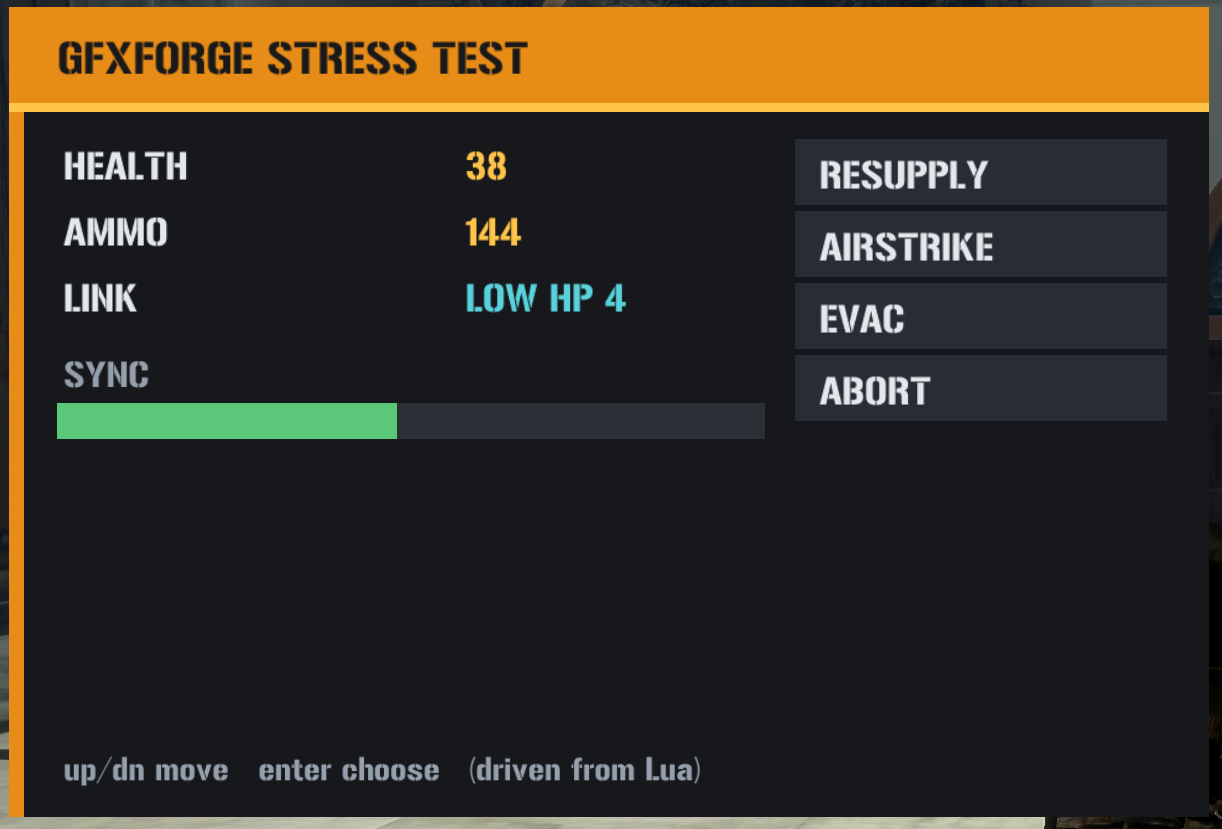
A stress-test panel that combines all of the above renders and runs in Mercenaries 2. Confirmed on real hardware: layered shapes render; imported-font text renders; variable-bound text updates live when Lua pushes values; the bidirectional fscommand event bridge fires (movie → Lua → movie round trip); and menu navigation/selection work (host drives selection, the movie reports the chosen index). (The selection highlight initially drew behind the opaque buttons and was changed to an opaque accent marker drawn on top.)
A second panel — an “OPERATOR STATUS” HUD authored entirely in gfxforge-web (background panel, two live text fields, a script-scaled health bar, a button, and a keyboard-navigable menu) together with its generated hud.lua — is also confirmed on real hardware, including the show/hide toggle and Up/Down menu navigation.
How it works (technical)
The movie format
A .gfx is a SWF tag stream with a GFX magic and a Scaleform ExporterInfo (tag 1000) as the required first tag. A minimal renderable movie is: RECT + framerate + framecount, then ExporterInfo(1000) / FileAttributes(69) / SetBackgroundColor(9) / DefineShape3(32) / PlaceObject2(26) / ShowFrame(1) / End(0). gfxforge writes uncompressed GFX v8 and tags the ExporterInfo version as 0x0207 to match the retail (GFxExport 2.07) era.
The one detail that matters most: PlaceObject2
The long-standing “custom movies render blank” problem came down to one wrong flag bit in PlaceObject2. The flags byte must set HasCharacter (0x02) to actually place a character on the display list; the value 0x40 is HasClipDepth, not HasCharacter. Movies that used 0x40 defined their shapes but never placed them — a clean blank with no error. gfxforge always emits 0x06 (HasCharacter | HasMatrix) with a real matrix.
Text: import, don’t embed
The shared font _normal_Font is a DefineFont3 the game loads globally (from GFxFontLib). Movies import it with ImportAssets2 and reference it from DefineEditText; nothing is embedded. Setting a field’s variable name binds it, so _root.<var> = value (from AVM1, driven by Lua) updates the display.
Behaviour and the bridge
GFx runs AVM1. gfxforge emits DoAction blocks that define functions the host calls. fscommand(cmd, val) compiles to an ActionGetURL2 with a "FSCommand:" URL, which the game routes to the handler registered by SetFlashEventHandler. Note there is no SetFlashVariable in the Lua bridge — dynamic text is changed by calling an AS2 function (or a variable-bound field), not by setting a variable directly.
Input
Native mouse/controller routing to a HUD FlashWidget is not confirmed. In practice input is driven from Lua: the lua-loader can watch keys (Loader.IsKeyDown / Loader.PopKeyEvents, the same edge-triggered press-tracking idiom the cheat-menu’s own toggles use) and call Move/Choose/SetSelected on the movie. This makes buttons and menus usable regardless of native input — the same “no native continuous input” wall the Freecam deep dive hit and solved a different way (hijacking the PDA widget’s own input event instead of polling keys).
Worked example
In gfxforge-web you’d draw this on the canvas and let it generate the Lua; the Python API below is the equivalent for scripted or batch authoring.
Author (Python, gfxforge):
from gfxforge import Movie, compiler

m = Movie(200, 60, name="hp", background=(22, 24, 28))
m.rect(0, 0, 200, 20, fill=(232, 140, 24))
m.text(6, 3, "HEALTH", size=13, color=(25, 25, 25))
m.text(6, 26, "--", size=14, color=(255, 196, 72), var="hp_val")   # dynamic field
m.script(compiler.compile_source('''
    function SetHealth(n) {
        _root.hp_val = n;
        if (n < 25) { fscommand("warn", n); }
    }
'''))
m.save("hp.gfx")
Inject (gfx_tool):
gfx_tool new --wad vz.wad --name hp --movie hp.gfx --out vz-patch.wad
Drive (Lua, in a widget that loaded hp.gfx):
widget:CallActionScriptCallback("SetHealth", { 87 })   -- updates the field
widget:SetFlashEventHandler("warn", function(_, v)      -- fires when health < 25
  -- react in Lua
end, {})
The stress-test script
The panel described under “Confirmed working in-game” above — layered shapes, static and dynamic text, an AVM1-driven scale bar, a compiled menu, and the full bidirectional event bridge, all in one screen — is exercised end to end by a paired script/asset: stress_test.py (gfxforge, authors the stress.gfx movie this loads — not reproduced here) and stress_test.lua, the host side, in full below. It’s an ordinary OnKey script like any other on this wiki: drop it in scripts/OnKey/, map a key in lua_loader.ini, press it.
A few things worth knowing before the listing:
MrxGuiBase.FlashWidget:new(),AddWidget, andMrxGuiManager.AddWidgetToHudare the same widget plumbing every native HUD element is built from — see MrxGuiBase and MrxGuiManager. AFlashWidgetis just aWidgetsubclass pointed at a.gfxfile.- The value cycle and the key-poll loop are both a self-rescheduling
Event.Create(Event.TimerRelative, ...)—TimerRelativeonly fires once, sotick()/poll()each re-arm their own next call as their first line. Same pattern documented on Engine Namespaces: Event, confirmed reliable in Snippets. - Menu interaction never touches the native
MrxMultiPageMenu(see Your First Menu if that’s what you actually want instead) — Up/Down/ Enter are polled withLoader.IsKeyDownand translated intoMove/Choosecalls straight into the movie’s own compiled AS2 menu viaCallActionScriptCallback. The movie owns selection state and visuals; Lua only ever says “up,” “down,” or “pick this one,” and listens for thechooseevent fired back. (SetSelectedis also available for jumping straight to an index — the bonusmenuClickhandler in the script uses it.) _G.STRESSis why a second press of the key pauses/resumes instead of rebuilding — the same_G-guard persistence idiom used by every statefulOnKeyscript on this wiki (see Your First Menu if this is new).
-- GFXFORGE STRESS TEST (host side) — pairs with stress_test.py, asset "stress".
-- Drop in <game>/scripts/OnKey/ and map a key in lua_loader.ini ([OnKey]
-- stress_test.lua=home). Get in-world, press Home to build it; Home again
-- pauses/resumes the value cycle.
--
-- Exercises, end to end:
--   * shapes + static/dynamic text render (SetHealth/SetAmmo -> bound fields)
--   * an AVM1-scaled bar             (SetSync -> _root.bar._xscale)
--   * a compiled menu                (Move/Choose/SetSelected)
--   * movie -> Lua events            (warn, choose) via SetFlashEventHandler
--   * input with no native mouse     (lua-loader key watch -> Move/Choose)
local KEYVAL = "home"                       -- must be in the first 10 lines

import("MrxGuiBase")
import("MrxGuiManager")

local VK_UP, VK_DOWN, VK_ENTER = 0x26, 0x28, 0x0D   -- arrows + Enter (tune freely)
local CYCLE = 0.30                                   -- value-cycle interval (s)
local POLL  = 0.05                                   -- key-poll interval (s)
local LABELS = { [0] = "RESUPPLY", [1] = "AIRSTRIKE", [2] = "EVAC", [3] = "ABORT" }

_G.STRESS = _G.STRESS or { step = 0, paused = false }
local S = _G.STRESS

local function call(fn, args)               -- Lua -> movie (guarded)
  if S.w then pcall(function() S.w:CallActionScriptCallback(fn, args or {}) end) end
end

local function build()
  local player = Player.GetLocalPlayer()
  local w = MrxGuiBase.FlashWidget:new()
  pcall(function() w:SetOwner(player) end)
  w:SetLocation(30, 60, 430, 330)           -- 400x270 movie
  w:SetSwfFile("stress.gfx", nil, nil)
  MrxGuiBase.AddWidget(w)
  pcall(function() w:SetVisible(true) end)
  pcall(function() MrxGuiManager.AddWidgetToHud(player, w) end)
  S.w = w
  -- movie -> Lua events
  pcall(function() w:SetFlashEventHandler("warn", function(_, v)
    call("SetStatus", { "LOW HP " .. tostring(v) })
    Loader.Printf("[stress] <- warn hp=" .. tostring(v))
  end, {}) end)
  pcall(function() w:SetFlashEventHandler("choose", function(_, v)
    local opt = LABELS[tonumber(v) or 0] or tostring(v)
    call("SetStatus", { "SEL " .. tostring(opt) })
    Loader.Printf("[stress] <- choose i=" .. tostring(v) .. " (" .. tostring(opt) .. ")")
  end, {}) end)
  pcall(function() w:SetFlashEventHandler("menuClick", function(_, v)   -- bonus mouse path
    call("SetSelected", { tonumber(v) or 0 }); call("Choose", {})
  end, {}) end)
  return w
end

-- value cycle: sweeps HEALTH (dips < 25 to trigger the warn round-trip), AMMO, SYNC
local function start_cycle()
  if S.cycleOn then return end
  S.cycleOn = true
  local function tick()
    Event.Create(Event.TimerRelative, { CYCLE }, tick)
    if S.paused or not S.w then return end
    S.step = (S.step or 0) + 1
    call("SetHealth", { 100 - (S.step * 11) % 100 })   -- number, so AS2's n<25 works
    call("SetAmmo",   { 30 + (S.step * 17) % 300 })
    call("SetSync",   { (S.step * 9) % 101 })           -- 0..100 -> bar._xscale
  end
  tick()
end

-- menu nav via the lua-loader key watch (edge-triggered)
local function start_keys()
  if S.keysOn then return end
  S.keysOn = true
  local pu, pd, pe = false, false, false
  local function poll()
    Event.Create(Event.TimerRelative, { POLL }, poll)
    if not S.w then return end
    local u, d, e = Loader.IsKeyDown(VK_UP), Loader.IsKeyDown(VK_DOWN), Loader.IsKeyDown(VK_ENTER)
    if u and not pu then call("Move", { -1 }) end
    if d and not pd then call("Move", { 1 }) end
    if e and not pe then call("Choose", {}) end
    pu, pd, pe = u, d, e
  end
  poll()
end

local ok, err = pcall(function()
  if not S.w then
    build(); S.paused = false
    start_cycle(); start_keys()
    Loader.Printf("[stress] built; cycle + key watch running (up/dn move, enter choose)")
  else
    S.paused = not S.paused
    Loader.Printf("[stress] value cycle " .. (S.paused and "PAUSED" or "RESUMED"))
  end
end)
if not ok then Loader.Printf("[stress] ERROR: " .. tostring(err)) end
Limitations / not yet supported
- Fills: solid colours are the reliable primitive; rounded corners and outline strokes also render. Gradients do not — GFx externalizes gradients (
DefineExternalGradient), and the inline SWF gradient the editors can emit renders flat, so gradient fills are disabled in gfxforge-web. Arbitrary vector paths aren’t emitted either. - Fonts: the game’s shared
_normal_Fontonly — no arbitrary embedded typefaces (that needs a TrueType→glyph converter, not built). - Bitmaps / images: not authored as inline pixels. GFx keeps images as external textures (ASET
type_id 27), a separate injection pipeline; DXT compression also requires Scaleform’sgfxexport. (gfxforge-web can encode an inlineDefineBitsLossless, but GFx renders it blank for the same external-texture reason, so the image tool is disabled.) Pure vector + text + scripting needs none of this. - AVM1 compiler:
&&/||are not short-circuit; calls are by name or method. The Python subset has noforloop; the browser build addsfor, arrays, andbreak/continue. - Input: a HUD
FlashWidgetgets no mouse, so buttons and menus are driven from the lua-loader key watch (edge-triggeredLoader.IsKeyDown), not clicks — see Notes & gotchas. - Movies are single-frame (no timeline/tween animation exposed, though AVM1 can animate a clip’s properties over time).
Notes & gotchas
- A HUD widget composites transparent — the stage colour is not a background. A movie’s
SetBackgroundColoris not painted when it’s loaded into a HUDFlashWidget; the widget overlays the game world with a transparent background, so the world shows through wherever no shape is drawn. For a solid panel, draw a full-stage rectangle as the bottom layer — don’t rely on the stage/background colour, which is only a preview aid in the editors. - Hide/show with your own state flag, not
IsVisible.Widget:SetVisible(bool)works (it’s how you show a widget), but there is noIsVisible— the getter isWidget:GetVisible()(see MrxGuiBase). And even that is a trap for a toggle: engine getters return1/0, and in Luanot 0isfalse(onlynil/falseare falsy), soSetVisible(not w:GetVisible())never flips. Keep a boolean in your_Gstate table and callSetVisible(S.shown). - Menu keyboard navigation must be wired by hand. The highlight only moves when the host calls
SetSelected(i)/Move/Choose; a HUDFlashWidgetgets no mouse. PollLoader.IsKeyDownfor Up / Down / Enter on a self-rescheduling timer, edge-trigger it (compare against the previous frame so one press moves exactly one row — a raw poll fires ~20×/sec), track the selected index, clamp it to[0, rows-1], and callSetSelected. The stress-test listing above is a complete example. gfxexport(Scaleform’s proprietary exporter) is not required for vector + text + scripting — only for image-heavy movies. Everything above is emitted directly in Python.- Deploying a patch = copy the built WAD to
<game>/data/vz-patch.wad; revert by deleting it. A newOnKeyLua script + itslua_loader.inibinding only register on a game relaunch. - gfxforge is MIT and dependency-free; gfx_tool is MIT and depends (as a git dependency, with permission) on the Mercenaries-Fan-Build
mercs2-wad-simulatormercs2_formatscrate for the WAD/UCFX/ASET plumbing.